How Smart Banners™ Helped the Virginia Lottery Automate and Streamline Lottery Email Updates

Every year, tens of millions of people buy lottery tickets with the hopes of winning big. So, to generate interest, lottery brands must keep consumers up to date on the ever-changing jackpot prizes, drawing days, and lottery results. 

So Virginia Lottery turned to Zembula and implemented Smart Banners™ to help keep their players up to date with critical information about Mega Millions and Powerball jackpots. 

Here’s what happened.

The challenge: Find a way to easily automate lottery updates for customers 

With jackpot amounts for Mega Millions ranging into hundreds of millions of dollars, it’s no surprise buyers wanted to be updated on the jackpot and winning numbers. 

That was the challenge for Virginia Lottery. But, the team found it difficult to automate and personalize information at scale. Plus, they needed to keep in mind that numbers and drawing dates change frequently. Virginia Lottery had another goal, too. The marketing team wanted to find a way to easily display Powerball and Mega Millions jackpot amounts, specifically on days that would align with the drawing dates for each game.

The Virginia Lottery team wanted to utilize their email marketing better. Ideally, the marketing team hoped to automate key dates and jackpot information to customers and keep a great player experience while removing time-consuming and error-prone manual processes.  

The solution: Use personalized Smart Banners™ to personalize information

Virginia Lottery worked with Zembula and implemented Smart Banners™ to solve these challenges. 

virginia lottery smart banner

Together, the team at Virginia Lottery and Zembula created a Smart Banner™ that displayed lottery jackpot values in real-time. Since Zembula updates at moment-of-open and not moment-of-send, data can be automatically updated while campaigns send without needing to stop or pause them to do manual changes.

Using Zembula’s AI-powered Campaign Decision Engine, Virginia Lottery could create rules within the platform dictating when images would display on particular days. Then, when a jackpot amount hits all the parameters the marketing team sets, the Smart Banner™ appears in the emails. 

And if the parameters aren’t met, the banner shrinks to an invisible pixel, so nothing about the underlying email changes — it’s business as usual. 

The results: Smart Banners™ help streamline processes and remove manual updates

For the Virginia Lottery marketing team, Smart Banners™ made automatically sharing the latest Mega Millions and Powerball jackpot amounts easy. There was no need to manually add images, which helped streamline the processes and reduced potential errors. 
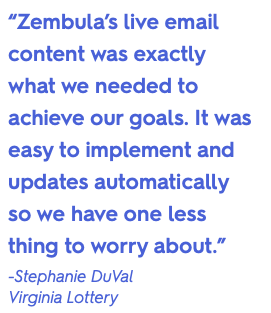
virginia lottery case study quote

With so much on their plate already, marketers know the value of having more effective workflows that help reduce the risk of mistakes. That can save your team from headaches and provide more time to focus on player engagement and creating more emails that drive a positive player experience. 

For lottery brands, that’s an essential way to stand out from the competition. 

Learn more about Smart Banners™

Do you want to find a solution to streamline your processes, remove tedious manual updates, and send personalized customer emails? 

Zembula has the solution. 

Learn how Smart Banners™ can improve how you connect with your lottery customers and give your brand more opportunities to drive engagement. 

Click here to connect with one of our experts and get a demo today.

About the Author

Liz Froment

Liz Froment is a content writer at Zembula. A graduate of University of Massachusetts at Amherst, Liz is a travel aficionado, Boston sports fan, and maple syrup connoisseur.

Performance marketing dials, inside email. For the first time.

See how we do it by booking a demo.

How Browse Abandonment Messages Can Help Your Brand

Liz Froment

You may have a secret weapon waiting in your data to help re-engage your customers. But are you using it?

With browse abandonment messages, you’re letting customers know via email or SMS that they should come back to your site and consider buying the item they were viewing. 

These messages can be as powerful as abandoned cart emails and texts, and your brand can see a big boost in revenue if you start incorporating them into the mix.

What is browse abandonment?

A browse abandonment message is an email or notification sent to a visitor after they view a product or category page on your site and then leave without buying anything. 

There’s no doubt you know about cart abandonment messages, which work similarly. They are both triggered emails based on consumer behavior. However, with a browse abandonment email, you don’t need to wait until something is put in a cart to send a message. 

Browse abandonment emails are a great way to put customer tracking data to good use. When you know the products they are viewing and potentially interested in, it’s a lot easier to send targeted personalized emails that try to drive re-engagement.

The data behind browse abandonment

A few years ago, SEMRush did a study that found only about 1-2% of customers who visit your page buy. That ties in with the idea that abandoned cart rates are around 70%.

The reality is the vast majority of people visiting your site are going to leave before they even consider buying. But, if you can catch the attention of the 20-40% who stick around and browse pages and products to come back and buy, you have an opportunity to add to your revenue. 

Some industries are also more likely to have higher browse rates than others. Travel is one. Think about your shopping behavior when planning a trip. You don’t go to the first site and buy; usually, it’s about reviewing prices and seeing what’s out there before you buy.

But, it turns out that as with other types of triggered emails, browse abandonment notifications often have higher open, click, and conversion rates than sales emails or newsletters. Of course, you can also see the same numbers with abandoned cart emails.

So if you’re already running a cart abandonment campaign, it makes sense to incorporate abandoned browse messaging into your email and SMS strategy too.

Examples of abandoned browse messages 

What do these types of messages look like in action? Check out a few of these examples.

For companies with long sales cycles, such as mattress retailers, an abandoned browse Smart Banner™ can help customers keep you top of mind without pressuring them to buy before they’re ready.

Learn how City Mattress used Smart Banners™ to help boost its revenue.

Couple your browse abandonment Smart Banner™ with loyalty memberships and let your program members know they can use their points to help pay for their purchases.

Use your abandoned browse Smart Banners™ to update customers on inventory too. It’s a great way to remind them if something they liked is going out of stock and helps build a little bit of FOMO (fear of missing out).

Customers love seeing what other buys have to say about your products. You can’t replace that level of trust in their peer group — so use it in your messages. Smart Banners™ let you add customer ratings and reviews into the mix.

Sweeten the pot to drive more action. For example, use an abanded browse Smart Banner™ to give potential customers a limited-time discount or free shipping if they act now.

Don’t forget about adding SMS into the mix too. Nearly all consumers open and view text messages within just a few minutes of receiving them. So it’s the perfect tool for reaching customers with personalized messages through different channels to extend message visibility.

Learn more about Smart Banners™

Incorporating Smart Banners™ into your email marketing strategy will enable you to send personalized cart and browse abandonment emails at scale more efficiently than you ever thought possible.

To learn more about Zembula’s Smart Banners™ get in touch. One of our email experts will set you up with a demo to get started. 

Click here to request a demo today.

About the Author

Liz Froment

Liz Froment is a content writer at Zembula. A graduate of University of Massachusetts at Amherst, Liz is a travel aficionado, Boston sports fan, and maple syrup connoisseur.

Performance marketing dials, inside email. For the first time.

See how we do it by booking a demo.

What Is Real-Time Email Personalization? How Smart Banners and Open-Time Architecture Work

Marc Sheforgen

Most email programs that say they use “real-time personalization” are actually doing something else. They pull customer data at the moment of send, freeze it into the HTML, and ship it to the inbox. If the customer opens 30 minutes later, the content is probably fine. If they open three days later, the loyalty balance is wrong, the cart has changed, and the promo might have expired. If they open eight days later (and plenty do), the email is showing information that is flatly inaccurate. That is not real-time. That is a snapshot, and Smart Banners, Smart Kickers, and open-time decisioning exist specifically because snapshots break.

The distinction between send-time and open-time personalization is not a marketing nuance. It is an architectural choice that determines whether your personalized content earns revenue or erodes trust. And across Zembula’s platform data (7.295 billion personalized opens), one stat keeps surfacing: more than 10% of email revenue from mature programs comes from opens that happen more than a week after the email was sent. That tail is long, and it is valuable. Send-time personalization treats it as an afterthought. Open-time personalization treats it as the opportunity it is.

Moment of Send vs. Moment of Open: The Distinction That Decides Revenue

Send-time personalization works like a print run. Your ESP queries data sources, populates merge fields, builds the HTML, and sends a static email. Everything in it reflects reality at the moment of send. The customer’s experience depends entirely on how quickly they open.

Open-time personalization flips the architecture. The email contains a lightweight image URL (as small as 2KB) that calls back to a decision engine at the moment of open. That engine checks the customer’s current behavioral state, selects the right content variant, renders the image, and serves it in real time. The difference is when the decision happens, and that “when” changes everything.

Think about what changes between send and open. Loyalty points accumulate. A customer adds (or removes) items from their cart. Inventory runs out. A sale starts or ends. Pricing changes. Weather shifts. With send-time data, every one of those signals arrives stale. With open-time, every one arrives current. As Personyze puts it: “Open-time email personalization lets your email show the right products, content, or promotions at the exact moment the recipient opens it, not at the moment it was sent.”

Why 10%+ of Email Revenue Comes From Opens More Than a Week After Send

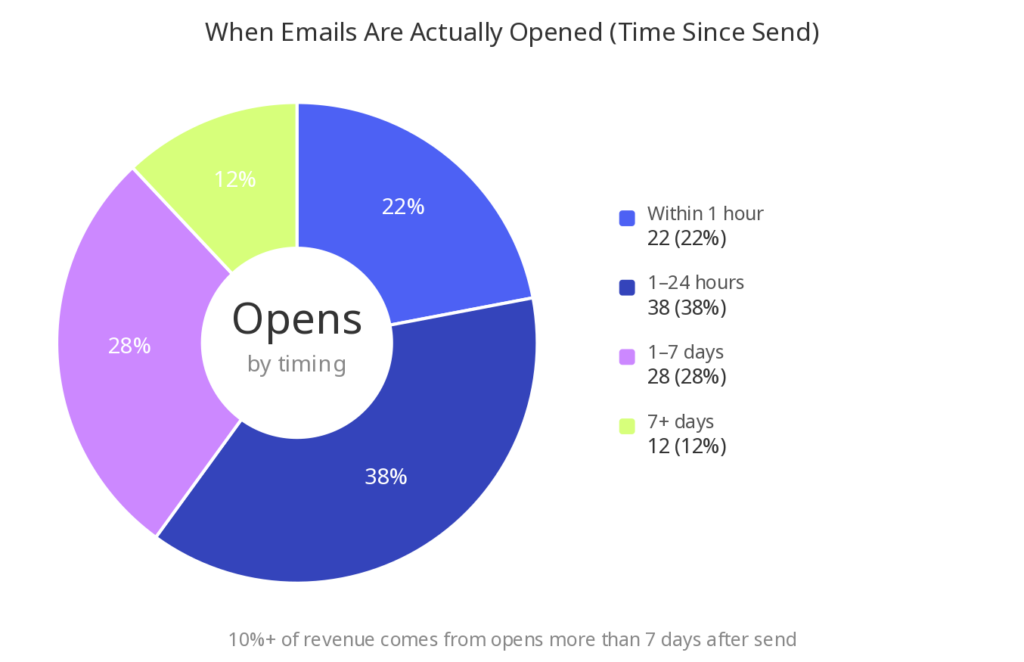
Email marketers tend to think of opens as concentrated in the first hour. Some are. But the distribution is wider than most teams realize.

Donut chart showing email open timing distribution with Smart Banners context

About 22% of opens happen within the first hour, and another 38% land in the 1 to 24 hour window. But a full 28% happen between 1 and 7 days after send, and 12% come after the one-week mark. Those late opens are not low-value stragglers. They disproportionately represent high-intent customers who revisit emails when they are ready to act. And if the content they see is a week old, you lose the conversion.

This is also why Apple’s Mail Privacy Protection (MPP) complicates send-time intelligence so badly. Litmus reports that over 50% of email opens now happen on a device with MPP activated, which means pre-fetching inflates open data and renders send-time optimization signals unreliable. The content decision has to move to the render layer, where the customer’s actual behavior at the actual moment of viewing drives what they see.

What Smart Banners and Open-Time Decisioning Look Like in Practice

At Zembula, open-time personalization takes the form of three modular content blocks: Smart Banners (top of email), Smart Blocks (mid-email), and Smart Kickers (bottom of email). Each is a single dynamic image URL that serves personalized content based on the customer’s state at open.

Here is what happens at the moment of open: the decision engine receives the image request, checks the customer’s real-time data (cart contents, loyalty tier, browse history, location, promotional schedule), runs through a priority-ordered set of content rules, selects the winning variant, renders the image on-the-fly, and returns it. The entire process happens in milliseconds. No template changes are required. No segmentation. One URL, hundreds of possible use cases.

A customer who abandoned a cart yesterday might see their abandoned product with current pricing. A loyalty member 200 points from the next tier sees a progress bar with an accurate balance. If a midnight promotional offer kicks in, emails already sitting in the inbox render the new promotion the next time they are opened. That is what “real-time” actually means.

Smart Banners Across the 95% of Email Volume That Has No Personalization

The conventional wisdom treats real-time personalization as a triggered-flow capability. Abandoned cart, browse abandonment, post-purchase. Those flows matter, but they represent roughly 5% of email volume. The other 95% is broadcast: weekly newsletters, promotional blasts, seasonal campaigns. And in most programs, broadcast email carries zero personalization beyond a first-name merge tag.

That is where Smart Banners change the math. Because a Smart Banner is a single image URL added once to the email template, it can run in every broadcast send without any additional build time. Each customer sees content personalized to their own behavioral context. The marketing team sends one email. The customer sees an email that looks like it was built just for them. This scales personalization from 5% of volume to 100% of volume, and that scale is where the revenue impact compounds.

The industry is slowly arriving at this conclusion from the other direction. Even Braze now publicly states that “an ongoing stream of meaningful, real-time customer data is the fuel” for marketing automation. Salesforce shipped its “Sub-Second Real-Time” open-time capability as a separately purchased Data Cloud product, because the core SFMC batch architecture could not support it natively. Real-time is a different stack. Not a toggle.

Measuring Whether Real-Time Is Actually Working: CTC, RPM, and the End of Open Rates

If you cannot measure the revenue contribution of a specific content block inside an email, you cannot prove that open-time personalization is working. Open rates are noise (half of them are machine-generated). Aggregate click rates tell you the email performed, but not which part of it performed. You need block-level attribution.

Zembula measures two metrics at the individual block, variant, and use-case level: click-to-conversion rate (CTC) and revenue per mille (RPM). CTC tells you what percentage of clicks on a specific block convert into revenue. RPM tells you the revenue generated per thousand impressions of that block. Both metrics operate at the creative-variant level, which gives email the same measurement granularity that paid media teams take for granted.

Across the Zembula platform, Smart Banners average a 13.6% click-to-conversion rate, compared to the 2.5% retail email baseline. That is not a marginal improvement. It is a structural difference that comes from showing a customer content that reflects their actual intent at the actual moment they are engaging. For more context on how these numbers compare to industry norms, see our latest email performance benchmark report.

This kind of block-level observability is what gives email attribution parity with paid ads. When your CFO asks what the return is on email personalization, RPM and CTC give you an answer at the same granularity as ROAS on a Meta campaign, except the audience is owned, the identity is first-party, and the measurement is privacy-durable.

Where to Start: A 10-Week Path From Static Email to Open-Time Personalization

Moving from static to open-time does not require a platform migration or a six-month roadmap. Here is a practical sequence:

Weeks 1 to 3: Instrument one Smart Banner. Add a single Smart Banner to your highest-volume broadcast template. Start with one use case, like abandoned cart content. Connect your cart data feed and publish. No segmentation needed.

Weeks 4 to 6: Layer in additional use cases. Add loyalty balance, browse abandonment, and a default promotional fallback. The priority engine handles selection automatically. One URL, multiple content variants.

Weeks 7 to 8: Add a Smart Kicker. Place a Smart Kicker at the bottom of the same template. Kickers consistently drive outsized click attribution because they catch high-intent readers who scroll through the entire email.

Weeks 9 to 10: Read the data. At this point you have CTC and RPM data at the block level across multiple use cases. You can see which content variants drive revenue and which do not. Expand to additional templates based on what the data tells you.

The point of a phased rollout is to prove the model with real numbers before scaling it. Most teams see measurable revenue contribution within the first billing cycle.

Key Takeaways

  • Real-time means open-time. If the data is pulled at send and frozen into the HTML, it is not real-time personalization. It is a snapshot that degrades with every hour that passes before the customer opens.
  • Late opens are high-value. More than 10% of email revenue comes from opens that happen 7+ days after send. Send-time personalization treats these as disposable. Open-time personalization treats them as opportunities.
  • Smart Banners scale personalization to broadcast. A single dynamic image URL added once to a template brings 1:1 personalization to every email, not just triggered flows. That is the 95% of volume most programs leave untouched.
  • Block-level attribution makes email measurable like paid media. CTC and RPM at the variant level give email marketers the same reporting granularity that ad teams have. That is how you justify budget reallocation from paid acquisition to owned-channel performance.
  • You do not need a platform migration to start. A single Smart Banner in one broadcast template, connected to one data source, can prove the model in weeks.

About the Author

Marc Sheforgen

Marc Sheforgen writes email service provider content for Zembula. Beyond that, he’s all about parenting, coaching kids, record collecting, travel, and adventure. If it’s fun, he’s for it.

Performance marketing dials, inside email. For the first time.

See how we do it by booking a demo.