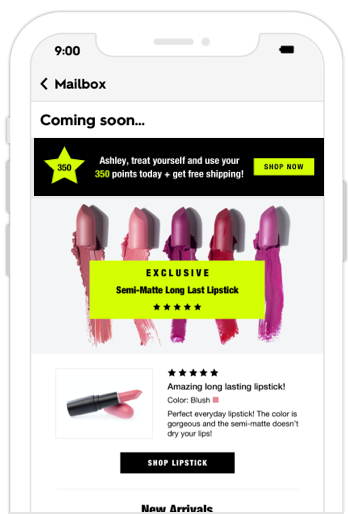
The most efficient way to deliver high fidelity personalization in your daily email, and drive over 11x return on spend (works seamlessly with your existing email service provider).
Infinitely expand your brands photography with Curator™ AI. Generate new product photography that’s indistinguishable from the originals, and combines multiple products together.
Create, manage, deploy, and target an unlimited number of personalized messages. Deliver any of the messages from your pool through a single image URL and link embedded within email, SMS, mobile, or on your website.
Zembula connects with any enterprise data source. If you don’t see a specific data source here or have a custom data source, we will always connect it for free.
The most efficient way to deliver high fidelity personalization in your daily email, and drive over 11x return on spend (works seamlessly with your existing email service provider).
Infinitely expand your brands photography with Curator™ AI. Generate new product photography that’s indistinguishable from the originals, and combines multiple products together.
Create, manage, deploy, and target an unlimited number of personalized messages. Deliver any of the messages from your pool through a single image URL and link embedded within email, SMS, mobile, or on your website.
Integrations
Connect with 100+ integrations
Zembula connects with any enterprise data source. If you don’t see a specific data source here or have a custom data source, we will always connect it for free.
5 Ways eCommerce Brands Can Use Personalized Smart Banners™
We all know email works. But, it doesn’t work in the same way for every brand and industry. There are specific challenges and opportunities for service brands versus retailers versus eCommerce shops. You shouldn’t take a one-size-fits-all approach to your email marketing. Otherwise, you’re going to disappoint your customers and miss out.
That’s why eCommerce brands need to focus on the strategies and tactics that will help them reach customers, build good relationships, and sell products. Email personalization is a huge driver of success and should be one of the key focus areas for your campaigns.
So, eCommerce brands need to develop innovative ways to engage customers, offer personalized email content, and increase message visibility. How to do it? We’ve got just the tool to help: Smart Banners™.
Say bye to generic email blasts
Sending out a generic email not aimed at anyone specific may have worked in the past, and you’ll still get a few clicks today. But, there is a better way to do it, and that’s with Smart Banners™.
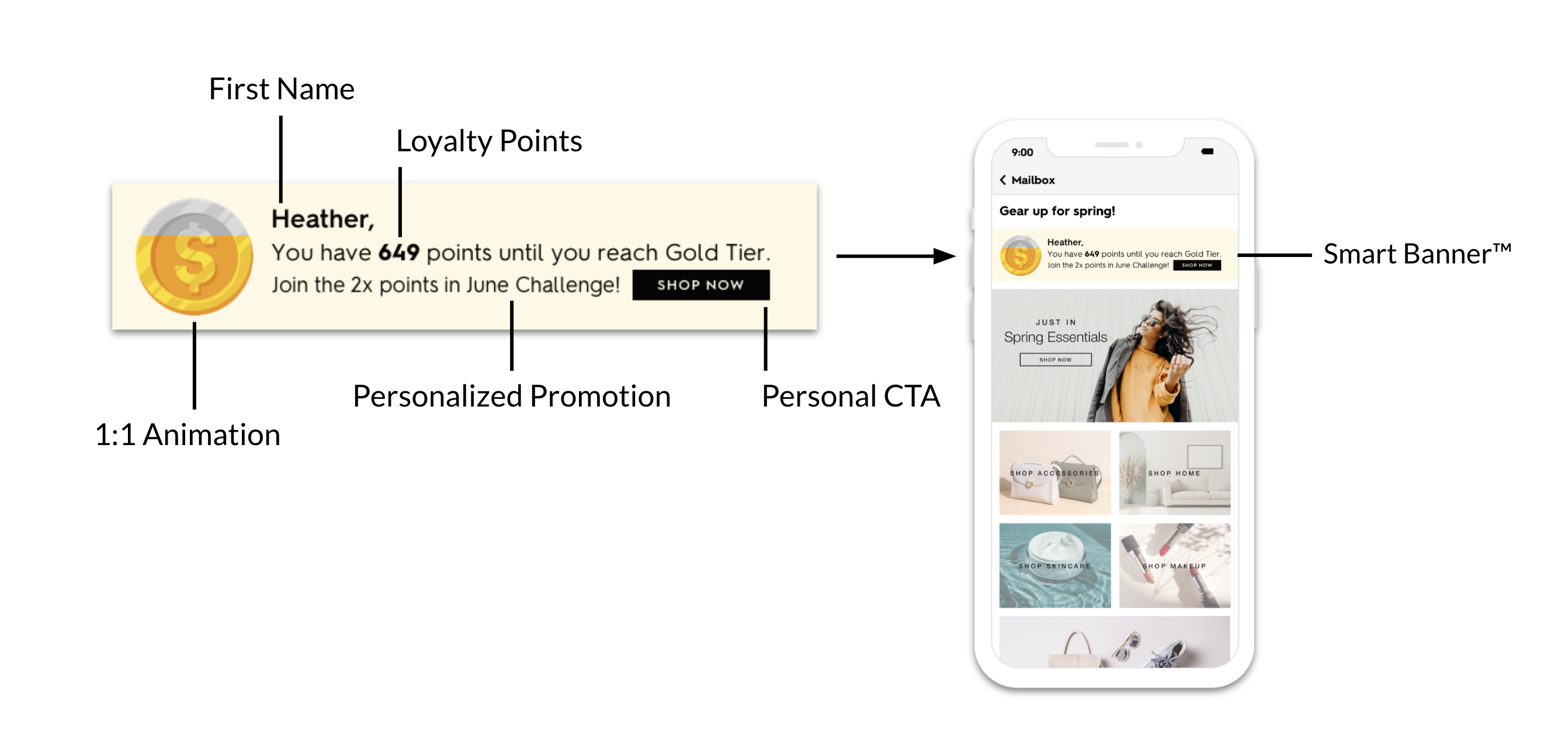
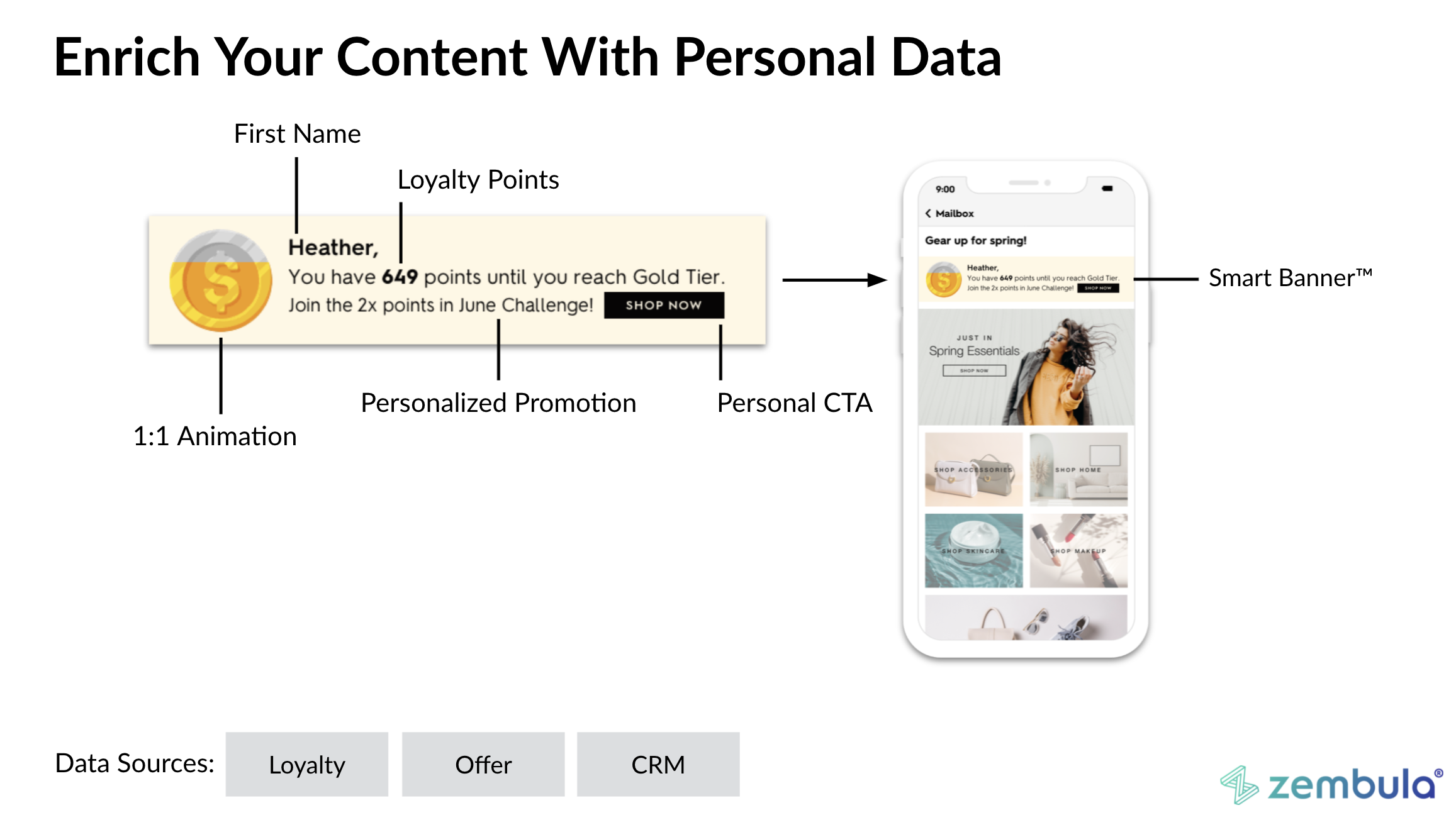
A Smart Banner™ is an easy way to turn every email you send into something that’s personalized to your reader. Since more consumers demand personalized emails from eCommerce brands, you need to deliver. Otherwise, you may lose out on potential customers.
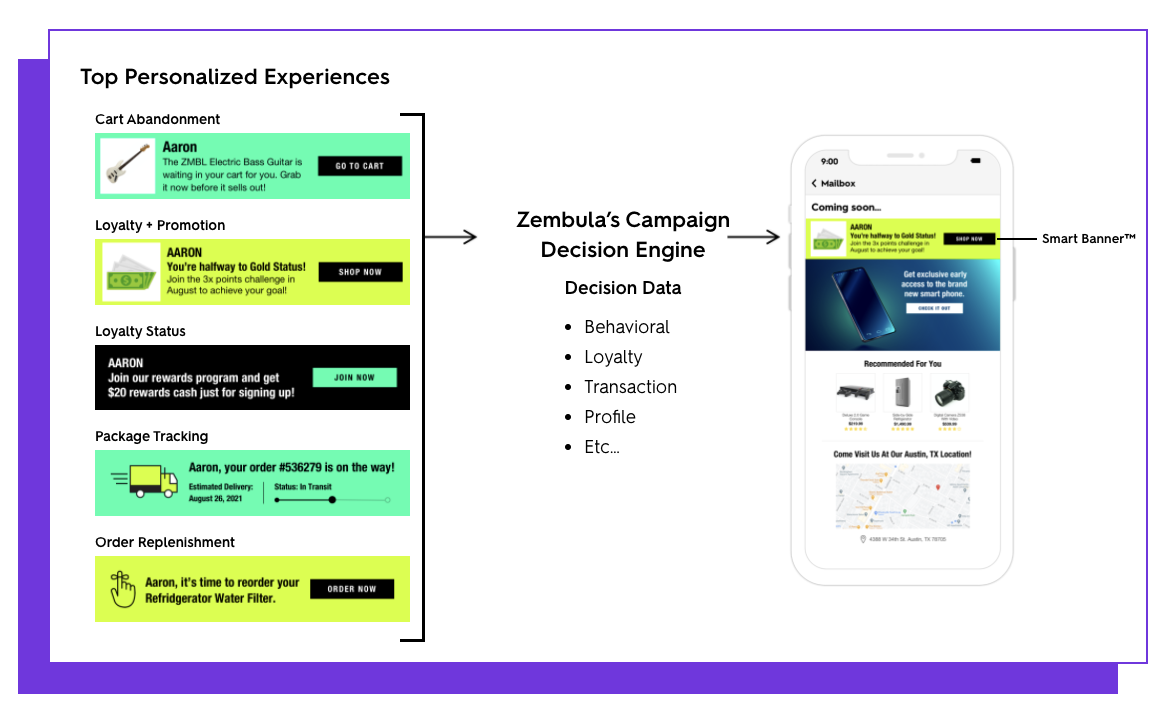
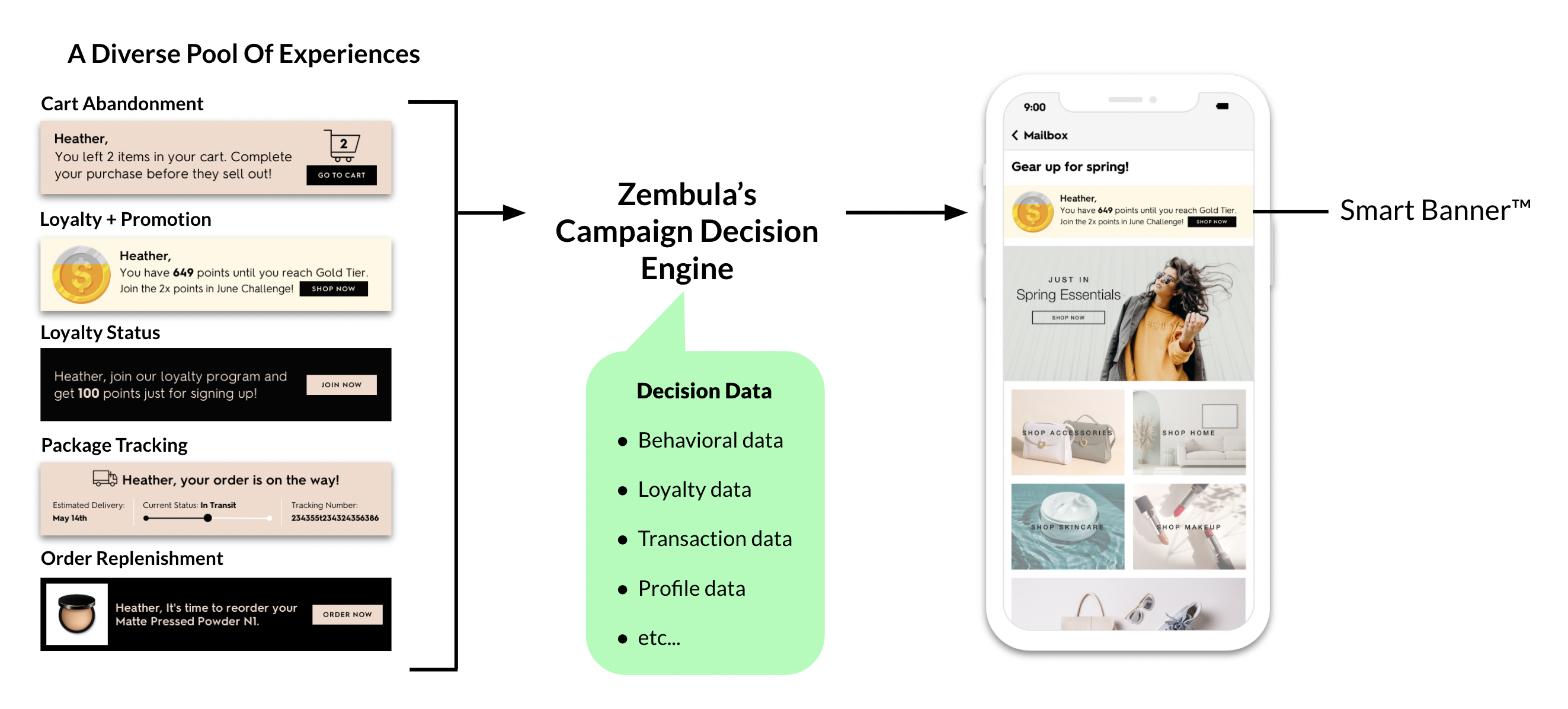
If you’re worried that level of personalization might be too much to handle, don’t — Smart Banners™ work by adding a snippet of code to your email templates. Using your customer data, our Decision Engine determines which Smart Banner™ goes to each customer. It saves you time and energy in the long run, leaving you to focus on other tasks.
Check out how eCommerce brands can use Smart Banners™
Want to see a few Smart Banners™ in action? We thought you’d never ask. For eCommerce brands, in particular, there are a bunch of different templates you can use to boost personalization and drive engagement.
Here are a few of our favorites:
Abandoned cart
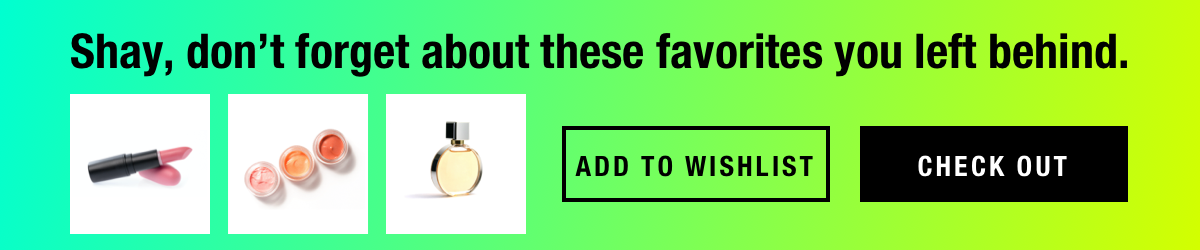
Of course, every eCommerce brand keeps an eye on those abandoned cart stats. However, with the cart abandonment rate floating around 70%, there are opportunities to get more conversions.
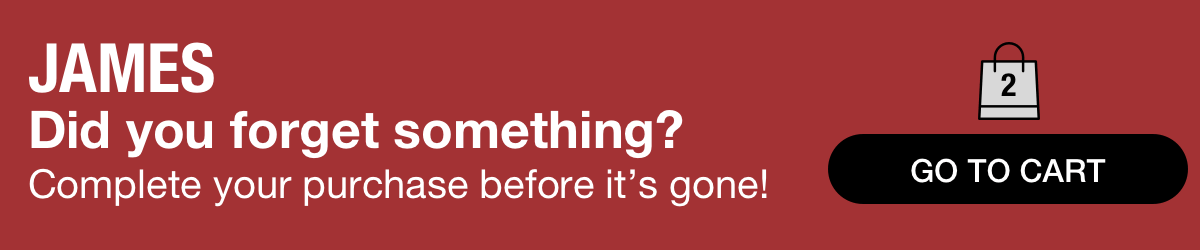
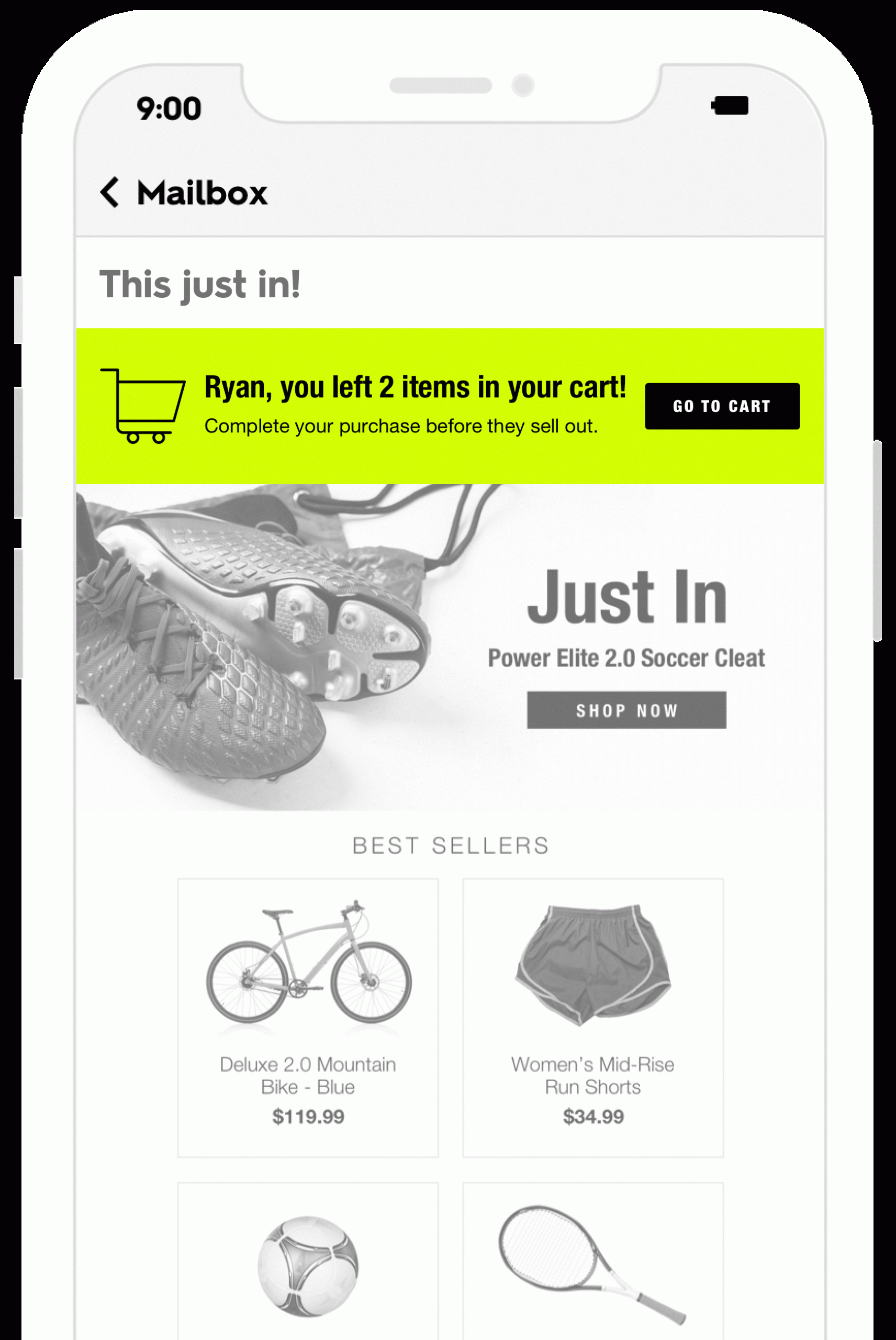
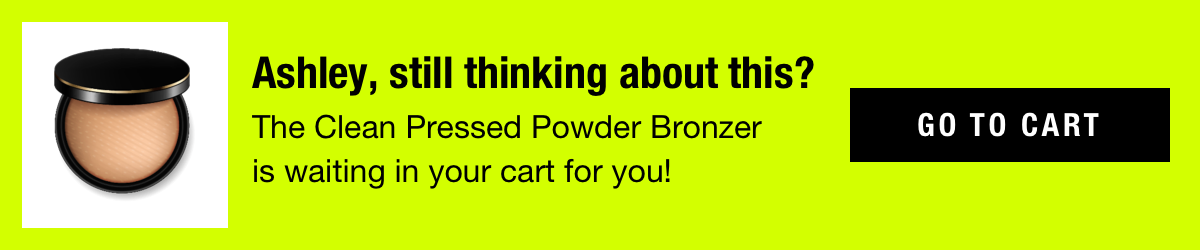
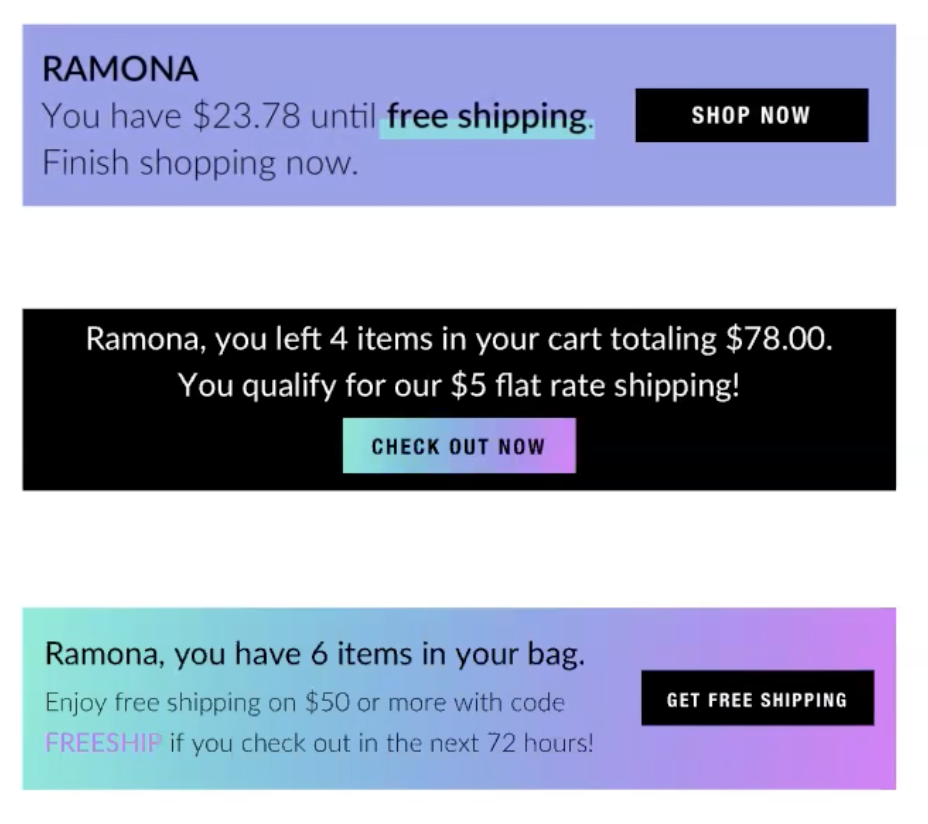
Here’s where Smart Banners™ can make a huge difference. When your reader has left something in their cart, a Smart Banner™ can appear on the top of every email you send, giving them personalized information and a call to action to complete the purchase.
Browse abandonment
Just as with abandoned cart Smart Banners™, you can add a similar level of personalization with browse abandonment notifications.
As long as you have customer browse data available, you can use it to send a reminder to your list that a product they looked at is still waiting for them. If you want to add a bit of FOMO, give them updates when inventory is running low or add a countdown clock.
Sales
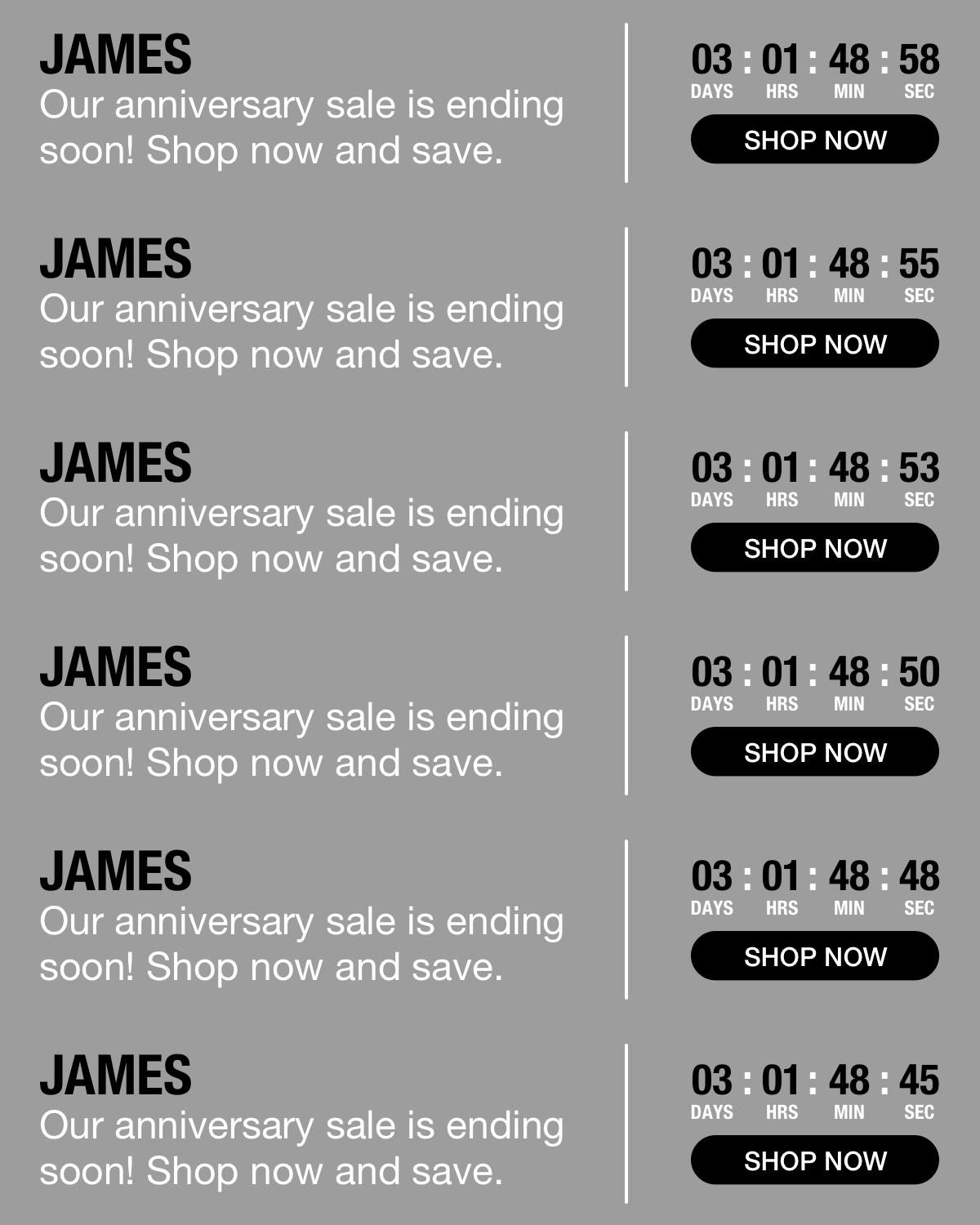
Marketing emails are a critical way eCommerce brands can get customers to buy. But, what if you have a flash sale, special event, or offer deals of the day? Is sending out one reminder email enough?
Probably not. Here’s another place where Smart Banners™ make all the difference. Now, when you have a sale event happen, keep that message visible all the time.
Package tracking
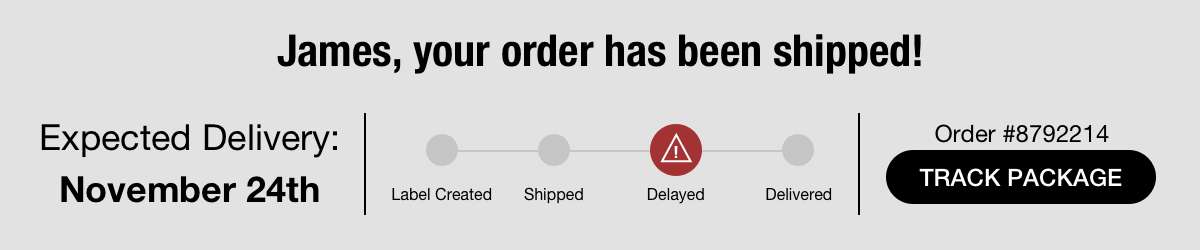
Any eCommerce brand knows just how important package tracking is for customers. If your customer doesn’t have tabs on their shipping information, you will probably get swamped with where are my order (WISMO) calls.
Smart Banners™ help remove the guesswork. Add these to your arsenal, and every time your customer opens an email from you, they’ll get the most up-to-date info on their package, reducing your WISMO calls.
Order replenishment
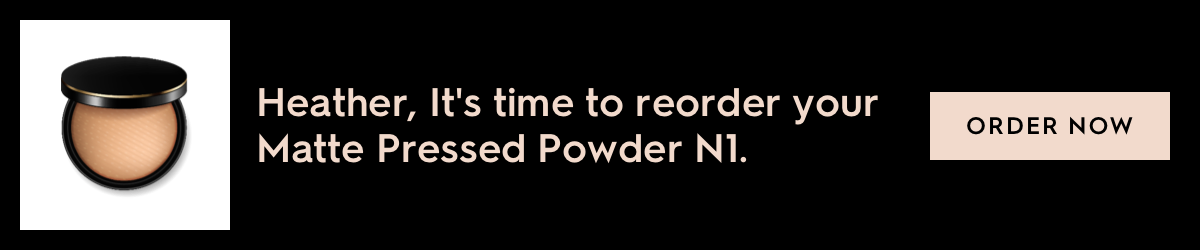
A key part of any eCommerce strategy is to get first-time buyers to come back for more. In most cases, that’s easier said than done. But personalized Smart Banners™ make it possible to improve your customer’s lifetime value.
Stand out by using a Smart Banner™ to remind customers to replenish their order. This is a great way to build a long-term relationship with your customer by giving them personalized product information based on what they’ve bought in the past.
Ready to give Smart Banners™ a try?
Your eCommerce email marketing strategy needs to go beyond the basics. Sending the occasional newsletter and sale announcement doesn’t cut it anymore.
We can help. Get in touch, schedule a demo, and see how Smart Banners™ can make a difference in your emails.
Liz Froment
Liz Froment is a content writer at Zembula. A graduate of University of Massachusetts at Amherst, Liz is a travel aficionado, Boston sports fan, and maple syrup connoisseur.
How Smart Banners™ Can Help Reduce eCommerce Cart Abandonment Rates
Nearly 70% of shoppers abandon their carts at some point during the buying journey. That’s a rate that should make many eCommerce brands nervous.
Of course, cart abandonment is inevitable. But, there’s also a lot of opportunity to drop those rates and start winning back buyers, improving conversions, and increasing revenue. A Smart Banner™ is the perfect tool to help you get started.
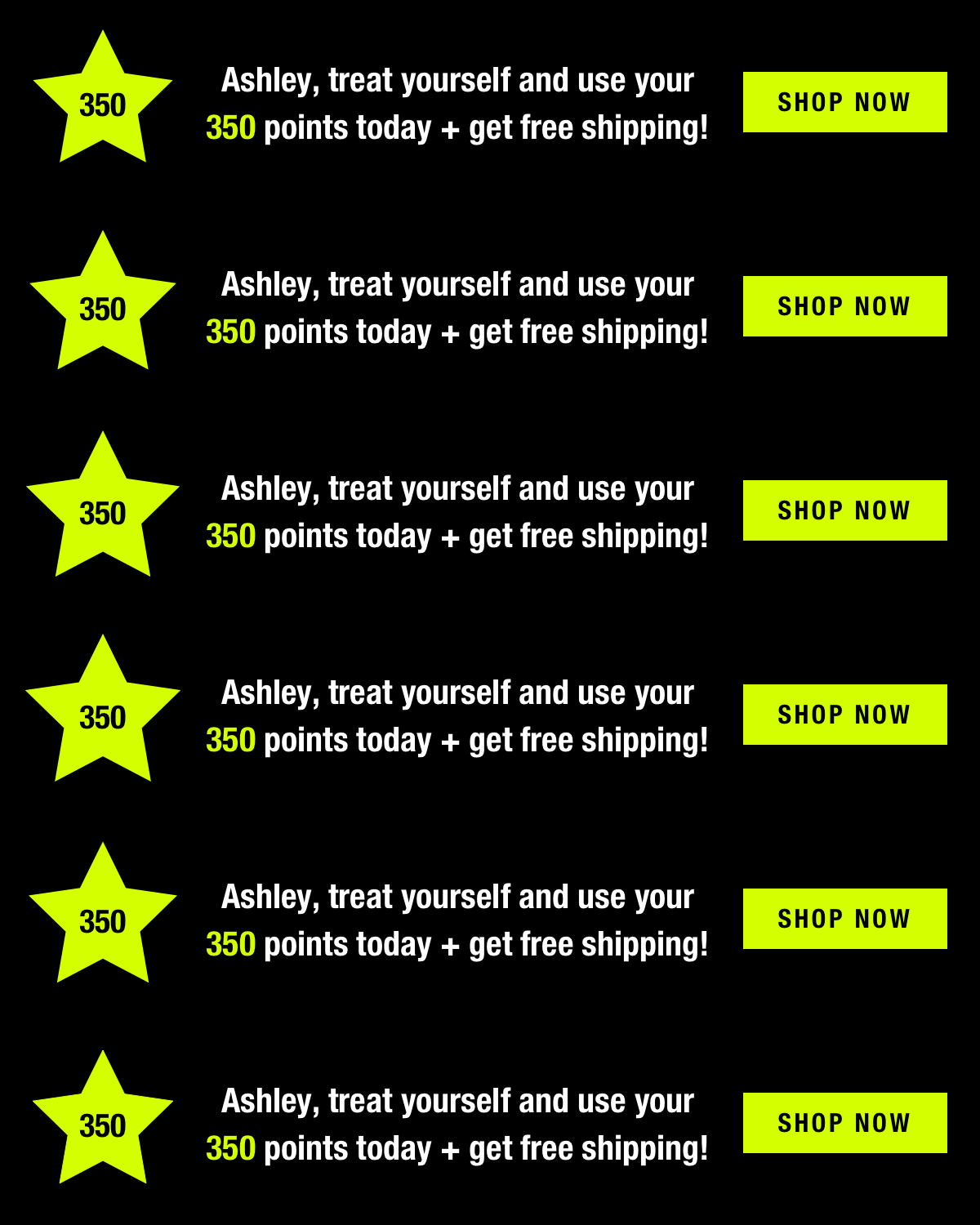
These banners sit above your email headers and convey all sorts of information to your readers based on their customer and behavioral data. For example, a Smart Banner™ can provide loyalty information, shipping updates, and announce sales. But the key for eCommerce brands is how Smart Banners™ can help you start attacking those abandoned cart rates.
Here’s how.
Hyper-personalization
You probably know by now that eCommerce customers want personalized content. Look at your inbox. Aren’t you more likely to open emails from the brands you know that always send you content that meets your interests or needs? Well, consumers are the same way. That’s why personalization matters so much — both now and into the future.
Smart Banners™ help you deliver personalized emails without needing to spend hours segmenting lists, running A/B tests, and starting and stopping campaigns to make tweaks. It doesn’t get much easier than that.
A Smart Banner™ can be added to any email to alert customers they’ve left something in their cart by using customer data, including shopping and browsing history. That means every email you send, from monthly newsletters to shipping confirmations, can be personalized with individualized customer information.
Few other tools will give you that level of hyper-personalization. It will make you really stand out from the competition.
Improved engagement
Another benefit to using Smart Banners™ is it helps your customers take action. For example, a standard abandoned cart strategy usually follows a typical three email campaign. While data shows you can get customers to come back and convert with this style of campaign, your chances are still limited, most campaigns only run for about 36 hours, and that’s it.
With a Smart Banner™, you can go way beyond a handful of emails and a hard time limit. Your notifications will increase message visibility. And the more people who see a message, the better the chances of getting more of them to click and convert.
Something else to consider is how it looks. While a Smart Banner™ is designed to be relatively unobtrusive compared to the rest of your email, it also catches the eye. You can add animation such as gifs or product images to remind your reader of exactly what they left in their cart. Personalized animation and moving images are powerful ways to grab attention right from the inbox.
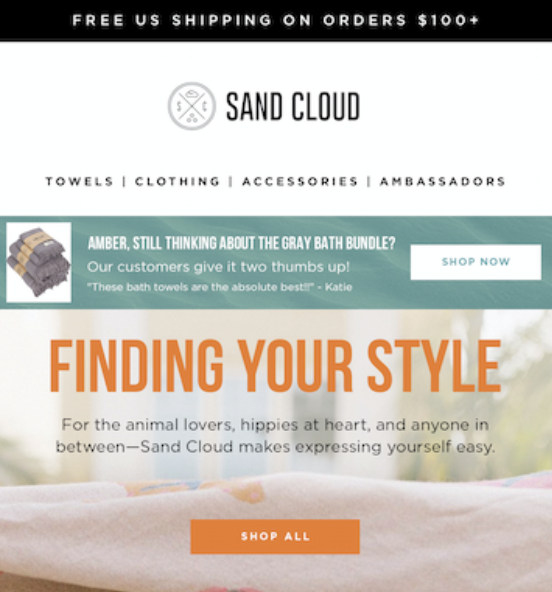
Another cool feature you can pull into Smart Banners™ with your browsing data is a browse abandonment notification. It’s just another way to provide more personalized image content. Consumers will see and be reminded of items they were previously interested in buying. Plus, it gives a gentle nudge to customers to click through and make the purchase.
Finally, Smart Banners™ have space for you to create a built-in call to action within the banner. When a customer sees this, they know they’re only a few clicks away from finishing up their purchase. It helps remove another barrier that may otherwise give a customer pause before going forward.
Smart Banners™ make it easy for customers to get back to their cart and buy, and they help you improve your numbers and get more conversions. That’s a win-win for eCommerce brands and consumers.
Interested in learning more?
If you want to see Smart Banners™ in action in your own campaigns, we’d love to help. You’ll see how Zembual can help you stay relevant with your customers, improve your workflows, and save time and money. Sound good?
Get in touch today, and we can set you up with a demo so you can take the platform for a spin.
Liz Froment
Liz Froment is a content writer at Zembula. A graduate of University of Massachusetts at Amherst, Liz is a travel aficionado, Boston sports fan, and maple syrup connoisseur.
The Ultimate Guide to Smart Banners: Turning Every Email Into a Revenue Opportunity
Email marketing has a math problem. The channel that brands depend on for predictable revenue is quietly eroding — not because subscribers stopped opening emails, but because most emails stopped being relevant. Smart Banners™ solve this by making every email personally relevant at the moment it’s opened, without changing a single workflow.
This guide covers the data behind email’s declining returns, why personalization fails at scale, how Smart Banners work, and the results real brands are seeing when they close the gap between what’s possible and what actually ships.
The Email Revenue Crisis: Why Email Personalization Matters More Than Ever
Email marketers have been telling the same story for a decade: email returns $36 to $42 for every dollar spent. It’s the most efficient channel in the stack. But that ROI figure measures platform costs against total attributed revenue — it says nothing about whether individual sends are getting more or less effective over time.
They’re getting less effective. Significantly less.
According to longitudinal data from Barilliance, batch email revenue per thousand sends (RPM) has dropped 43% from its 2018 peak. What once generated roughly $227 per thousand emails sent had fallen to approximately $130 per thousand by 2024. Per-send conversion rates tell the same story: a 35% decline from 1.63% to 1.06% over the same period.
This didn’t happen because email stopped working. It happened because the inbox got crowded. The Radicati Group estimates daily email volume grew 83% between 2018 and 2024, from 206 billion messages per day to 376 billion. Every brand increased send frequency. Every ESP made it easier to blast another segment. The result is predictable: more emails, same number of eyeballs, declining returns per send.
The $36-per-dollar ROI narrative masks this erosion because it measures the wrong thing. Platform spend (your ESP license, your team’s time) stayed roughly flat while revenue held up in aggregate — propped up by higher send volumes. But volume-driven growth has a ceiling. You can’t email your list five times a day.
Omnisend’s 2025 benchmark data and Klaviyo’s 2024 performance report both confirm the pattern: automated emails dramatically outperform batch sends, but batch sends still account for the overwhelming majority of volume. The gap between what’s possible and what most brands actually do is widening every quarter.
The question isn’t whether email works. It does. The question is whether your emails are working as hard as they could be — and for most brands, the honest answer is no.
The 5% Problem: Why Personalization Never Reaches Most Emails
The industry knows personalization works. The data is unambiguous. Automated, triggered emails — cart abandonment sequences, browse abandonment flows, welcome series, post-purchase follow-ups — earn roughly 16x more revenue per send than batch campaigns, according to Omnisend’s 2025 analysis. Klaviyo’s 2024 data shows that these automated flows generate 37% of total email revenue despite representing just 2% of send volume.
Read that again: 2% of emails drive 37% of revenue.
So brands invest heavily in personalization infrastructure. They build elaborate triggered flows. They integrate behavioral data. They hire lifecycle marketing specialists. And then they deploy all of that sophistication in roughly 5% of the emails they actually send — the triggered, automated flows.
The other 95% is broadcast. Promotional blasts. Campaign emails. The Tuesday sale. The new arrivals drop. At best, these get two segments — men’s and women’s — and a subject line test. They go out to the full list with identical content for every subscriber, regardless of what that subscriber has browsed, carted, purchased, or ignored.
This is the 5% problem. Brands have the data. They have the behavioral signals. They’ve proven that personalization drives dramatically better results. But they can’t operationally scale it beyond a handful of triggered flows because traditional personalization requires building and maintaining separate content for every permutation of audience and message.
The fix isn’t more automation workflows. It’s making every email — including the 95% that goes out as broadcast — personally relevant to each subscriber who opens it.
What Are Smart Banners? Dynamic Email Content That Personalizes at Open
Smart Banners™ are dynamic, personalized content blocks that appear at the top of every email a brand sends. They’re part of the Zembula Dimensions™ platform and work by rendering personalized content at open time — not send time — using the subscriber’s current behavioral, transactional, and profile data.
When a subscriber opens an email, Zembula’s Decision Engine evaluates that individual’s data in real time and selects the most relevant message from over 100 behavioral use cases. A subscriber who abandoned a cart sees their carted items with a low-stock warning. A loyalty member close to a reward tier sees their points balance and what they need to unlock the next level. A subscriber who browsed a category yesterday sees those products alongside a personalized offer.
This happens automatically, in every email, without the marketing team building or scheduling any of it.
The implementation model is what makes this operationally viable. Smart Banners require a single snippet of code placed once in your email template. After that, personalization runs autonomously. There are no new workflows to build, no segments to maintain, no content calendars to manage for the banner layer. The marketing team continues sending campaigns exactly as they do today — the Smart Banner adds a personalized layer on top.
Smart Kickers extend the same concept to the bottom of the email, giving brands a second personalized touchpoint in every send. Combined, Smart Banners and Smart Kickers frame every email with content tailored to the individual subscriber.
In an era where the Promotions tab is the default destination for commercial email, visibility matters more than ever. Smart Banners ensure that the first thing a subscriber sees when they open any email — whether it’s a flash sale, a newsletter, or a transactional confirmation — is content that’s specifically relevant to them. That relevance is what drives engagement, clicks, and ultimately revenue.
The 3-Signal Framework: What Drives the Highest-Performing Banners
Across 6.2 billion email opens analyzed in the Zembula Q4 2025 Benchmark Report, a clear pattern emerged in the highest-performing Smart Banner configurations. The use cases that consistently drive the strongest results layer three distinct signals into a single banner.
Behavior + Personalization + Urgency
Behavior is what the subscriber did: browsed a product, added to cart, made a purchase, let a subscription lapse. It’s the “what happened” signal — the action that makes the message contextually relevant.
Personalization is who the subscriber is: their loyalty tier, their points balance, their purchase history, their preferences. It’s the “who you are” signal — the data that makes the message feel individually crafted rather than generically targeted.
Urgency is why they should act now: low inventory on a carted item, a coupon expiring tomorrow, a price drop on a browsed product, a reward about to expire. It’s the “why now” signal — the catalyst that converts interest into action.
Consider the difference. A banner that says “You left something in your cart” uses one signal (behavior). A banner that says “You left something in your cart — and you have 2,430 loyalty points to redeem” uses two (behavior + personalization). A banner that says “You left something in your cart — use your 2,430 loyalty points before they expire Friday, and hurry: only 3 left in stock” uses all three.
The performance gap between single-signal and three-signal banners is substantial. The full data — broken down by use case category, signal combination, and performance metric — is available in the Q4 2025 Benchmark Report.
Smart Banners™ support over 100 behavioral use cases. Each one maps a subscriber’s real-time data to a specific, relevant message. The categories below represent the highest-impact groupings from Zembula’s benchmark analysis, ordered by overall revenue contribution.
Abandoned Cart Email Recovery
Cart abandonment banners consistently rank as the highest-performing category across all metrics. They work because the behavioral signal is strong — the subscriber already demonstrated purchase intent — and the message is specific: these are the exact items you left behind. When paired with urgency signals like low inventory or expiring offers, abandoned cart banners turn every email the subscriber opens into a recovery opportunity, not just the dedicated cart abandonment flow.
Loyalty & Rewards
Loyalty-based banners deliver the highest conversion rates of any category despite sometimes generating more modest click-through rates. This makes sense: a subscriber who clicks a banner showing their exact points balance and what they can redeem has already self-qualified as a buyer. These banners are particularly effective when layered with behavioral signals — showing a loyalty member their points balance alongside products they’ve recently browsed creates a compelling reason to act.
Offer Management
Coupon and promotional banners perform well across the board, but their effectiveness increases substantially when paired with behavioral data. A generic “20% off” banner performs adequately. A banner showing “20% off the jacket you were looking at — offer expires tomorrow” performs dramatically better. Smart Banners allow brands to surface the right offer to the right subscriber at the right time, rather than blasting the same promotion to the entire list.
Abandoned Browse
Browse abandonment banners capture subscribers earlier in the purchase journey. The behavioral signal is weaker than cart abandonment — browsing indicates interest, not intent — so these banners rely more heavily on personalization and urgency signals to drive action. Birthday pairings consistently produce the strongest results within this category, combining the browse data with a high-engagement personalization moment.
Reviews & Social Proof
Social proof banners — star ratings, review counts, customer testimonials — are most effective when tied to high-intent behavioral signals. Showing reviews for a product someone carted outperforms showing reviews for a product someone merely browsed. The further along the purchase journey the subscriber is, the more social proof helps close the gap between consideration and conversion.
Call Outs: Low in Stock, Price Drop, Back in Stock
Inventory and pricing signals — low stock warnings, price drops, back-in-stock alerts — are urgency plays. On their own, they provide moderate value. But when paired with behavioral data (showing a low-stock warning for a product the subscriber actually carted or browsed), they become powerful conversion drivers. The benchmark data shows that unpaired call outs underperform significantly compared to call outs layered with cart or browse behavior.
Results From Real Brands
The 3-signal framework and use case strategy aren’t theoretical. Enterprise retailers are deploying Smart Banners™ at scale and measuring the impact directly.
Forever 21
Forever 21 launched Smart Banners with 52 active use cases and was fully operational within two weeks. The program delivered 11x return on ad spend (ROAS), turning a fast-fashion brand’s high-volume email program into a personalized revenue channel. With 52 use cases running simultaneously, every email in Forever 21’s program carries a relevant, individualized message — from cart recovery to loyalty nudges to inventory alerts.
Thrive Causemetics deployed 67 use cases and achieved a 12x return on spend, with Smart Banners contributing a 17% lift in total email revenue. For a DTC beauty brand operating in a competitive category, that revenue lift came without adding a single new email to their calendar — the same sends, now individually personalized at the banner level.
J.Crew’s implementation demonstrates that even a focused set of use cases can deliver outsized results. With 19 active use cases, J.Crew achieved a 41x return on spend — the highest ROAS in Zembula’s published case studies. The results underscore that effective personalization isn’t about deploying every possible use case; it’s about deploying the right ones for your audience and product mix.
These brands join a roster of leading retailers using Zembula’s platform, including SPANX, NOBULL, and Sephora — companies that have made personalized email a competitive advantage rather than an aspirational line item on a roadmap.
How It Works: The Decision Engine and Implementation
Smart Banners™ are powered by Zembula’s Decision Engine — an AI-based system that evaluates each subscriber’s data at the moment they open an email and selects the most relevant banner in hundredths of a second.
Real-Time Decision Making
When a subscriber opens an email, the Decision Engine pulls their current behavioral, loyalty, transactional, and profile data. It evaluates every active use case — cart status, browse history, loyalty tier, available offers, inventory levels on relevant products — and determines which single message will have the highest impact for that subscriber at that moment.
This happens at open time, not send time. A subscriber who abandons a cart at 2 PM will see a cart recovery banner when they open that morning’s promotional email at 3 PM, even though the email was sent hours earlier. The content is always current because it’s rendered on demand.
Full Email Personalization
Smart Banners sit at the top of the email. Smart Kickers occupy the bottom. Smart Blocks can be placed anywhere in the email body. Together, they give brands the ability to personalize every section of every email without rebuilding their templates or content workflows.
The Zembula Dimensions™ platform manages all three, applying the same Decision Engine logic across each placement. A single email might show a cart recovery Smart Banner at the top, a loyalty points balance Smart Block mid-body, and a trending-in-your-size Smart Kicker at the bottom — all determined in real time for each subscriber individually.
Implementation: One Snippet, Zero Workflow Changes
Implementation is a single code snippet added to your email template. It works with any ESP — Klaviyo, Braze, Salesforce Marketing Cloud, Iterable, or any platform that supports HTML email templates. Once the snippet is in place, Smart Banners begin rendering automatically in every email that uses that template.
There’s no daily operational overhead. The marketing team doesn’t need to select banners, build segments, or schedule content for the personalization layer. The Decision Engine handles use case selection autonomously based on subscriber data.
The typical pilot timeline is six weeks from kickoff to full deployment, with approximately six hours of total effort required from the customer’s team — primarily for data feed configuration and template snippet placement. Zembula’s team handles use case configuration, creative setup, and QA.
Get the Full Benchmark Data
This guide covers the framework. The numbers behind it are in the Q4 2025 Benchmark Report.
Based on 6.2 billion email opens across Zembula’s customer base, the report breaks down performance by use case category, signal combination, and metric — including the specific click-through-to-conversion rates and revenue-per-thousand figures that show exactly which configurations drive the most value.
If you’re evaluating Smart Banners for your email program, or trying to optimize an existing deployment, the benchmark report provides the data you need to prioritize use cases and set realistic performance expectations.
See the full performance data for every use case category across 100+ behavioral configurations.
See Smart Banners in Action
The gap between what email personalization can do and what most brands actually deploy is the biggest untapped revenue opportunity in the channel. Smart Banners close that gap — automatically, in every email, starting in weeks.
If you’re sending more than a million emails a month and leaving the broadcast majority unpersonalized, the math is straightforward. Book a demo to see how Smart Banners would work with your email program, your data, and your use cases.
Liz Froment is a content writer at Zembula. A graduate of University of Massachusetts at Amherst, Liz is a travel aficionado, Boston sports fan, and maple syrup connoisseur.
Three Ways Personalized Emails Can Improve Lifetime Customer Value
Today, how your customer views your brand is just as important as the product or service you provide. In fact, many customers will drop your brand after a bad experience even if they like your product.
That means you have to fight a war on two fronts. First, you need to have an excellent product or service to offer customers. Then, you must guide them through an outstanding customer experience — from the first touch to post-purchase and beyond.
Do that, and you’re going to have a customer who sticks with you for the long term. But, obviously, that’s easier said than done. It takes a lot of effort on your end to create an improved customer experience that makes people want to not only buy once but keep buying again and again.
These are a few ways your emails can help.
Use data in a way that resonates with your buyers
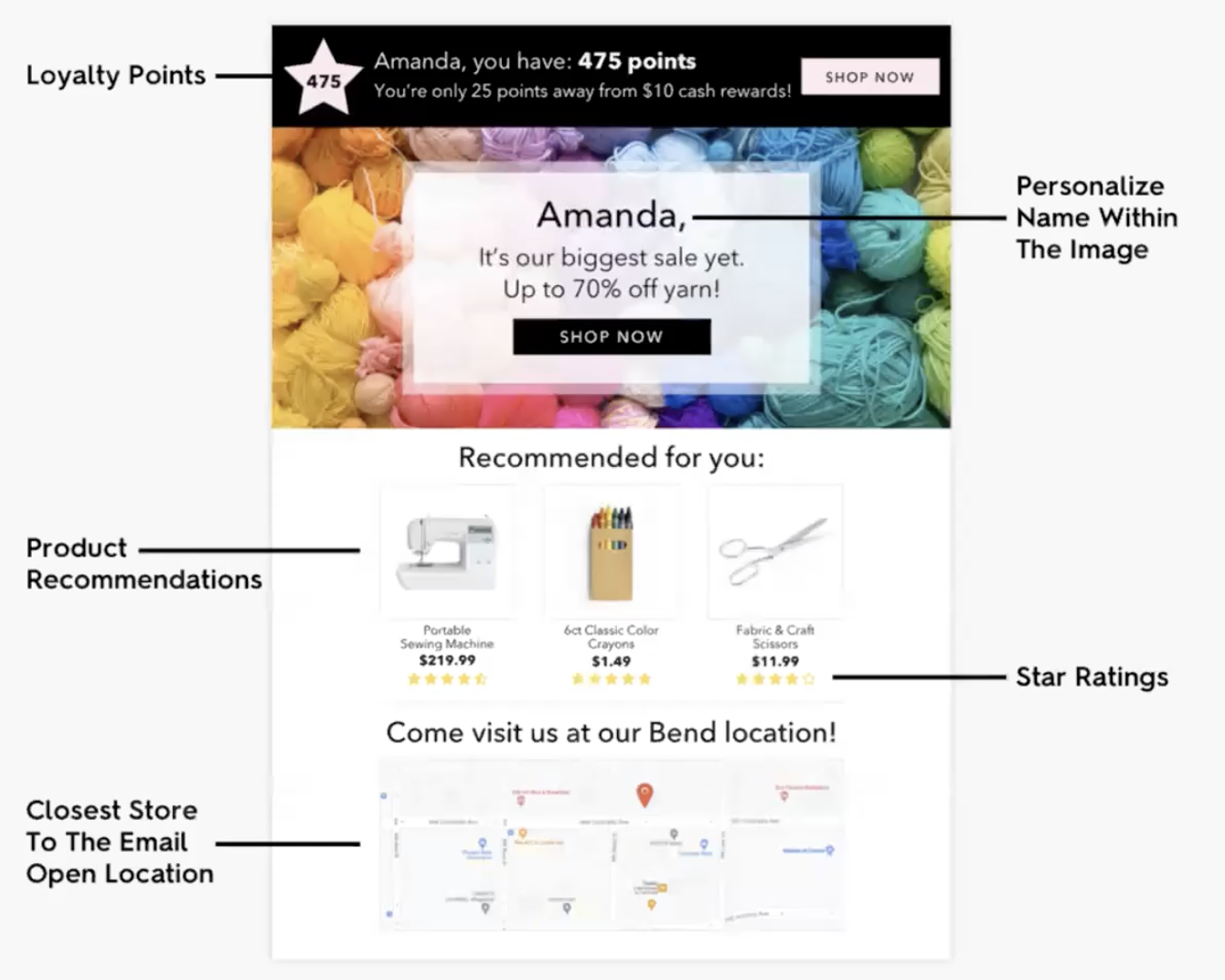
Here’s the great news, even with the simplest of setups, you have a ton of data available and right at your fingerprints. When you know your customer’s basic information: name, location, and shopping history, it’s that much easier to start creating personalized content.
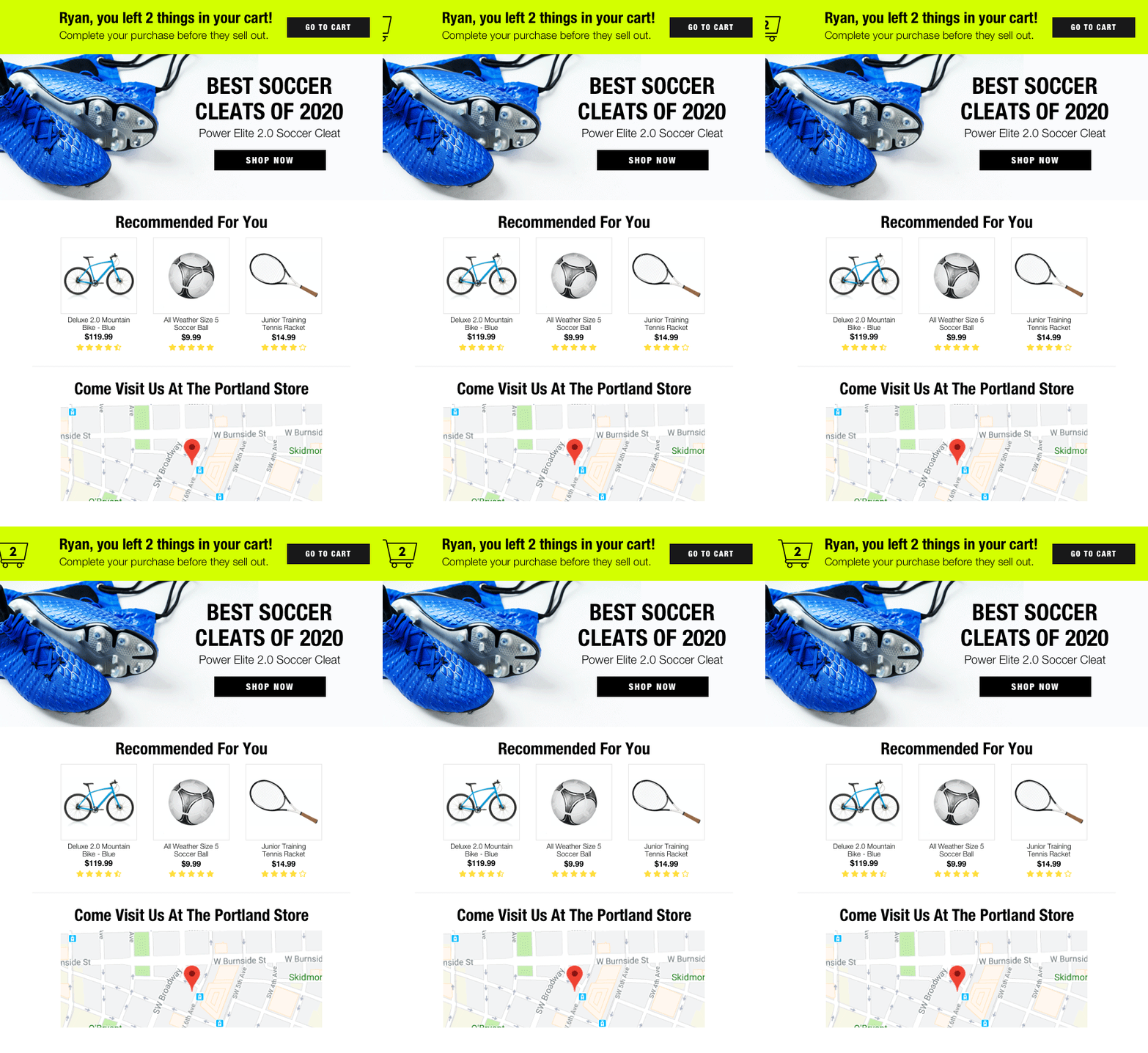
Check out the above email. In this snapshot, you’re telling your customer the story of their interactions with your brand. They get their loyalty information, custom product recommendations (with ratings), and local store information.
It’s hard to beat the impact of this sort of personalized content. It gives your customer the feeling that you’re speaking just to them. No one else is getting this same email. It stands out in a world where consumers crave individualized interactions with brands.
Go beyond marketing emails
Yes, the goal is to get clicks and conversions from every marketing email. But, the customer experience goes far beyond that. You need to always consider how to engage with and appeal to your customers in every email you send, including your transactional and customer support emails.
A recent study from Salesforce found this stat: “76% of customers expect consistent interactions across departments. However, 54% say it generally feels like sales, service, and marketing don’t share information.”
Every touch point you have with your customers, from in-store experiences to Instagram and email, forms their overall impression of your brand. If you want to extend a customer’s lifetime value, your strategy must include a consistent experience across it all. Personalization can’t stop at a sales email. It should continue through your shipping updates, customer service, and beyond.
Be adaptable
If the past two years have taught us anything, it’s that how the world operates can change very quickly. In 2020, we saw the rise of online shopping and eCommerce infiltrate every part of our lives, from grocery delivery to curbside pickup and changes in product availability.
Customers now are more online than ever, and they expect brands to catch up. Even if you aren’t selling a physical product but providing a service, consumers want to interact and engage with you digitally. That means for many brands, the old playbooks have been thrown out and it’s been a scramble to find new ways to reach customers with the information they need.
Message visibility has always been important, but maybe never more so than now. So you need to find ways to adapt quickly and make sure the messages you’re sending and the information you’re providing about products are always up-to-date. If not, customers will move on and buy from the brands that are using technology and data to meet their needs.
The bottom line
Marketers need to think about continuously building personalized relationships with customers. At first blush, that may seem like a daunting task.
We can help. With Zembula, you can incorporate your customer data into your emails, giving them the personalized experiences they crave without needing to call in your IT team, spend weeks A/B testing, or tinkering with code.
We make it easy. All you need is a snippet of code. Drag and drop it into our email templates, and you’re good to go. To learn more, get in touch today.
Liz Froment
Liz Froment is a content writer at Zembula. A graduate of University of Massachusetts at Amherst, Liz is a travel aficionado, Boston sports fan, and maple syrup connoisseur.
Clicks and conversions. Those are some of the critical metrics marketers watch to see if emails perform. If you’ve found your numbers stagnant, or worse, declining over time, it may be that you have an engagement problem.
If you can’t get people on your list to open and click your emails in the first place, it’s that much harder to see conversions. So it’s a serious problem you need to keep an eye on. If your numbers are lagging, there are probably a few reasons why.
Here’s what you need to look out for and some tips to fix it.
You’re not focusing on your customers from the start
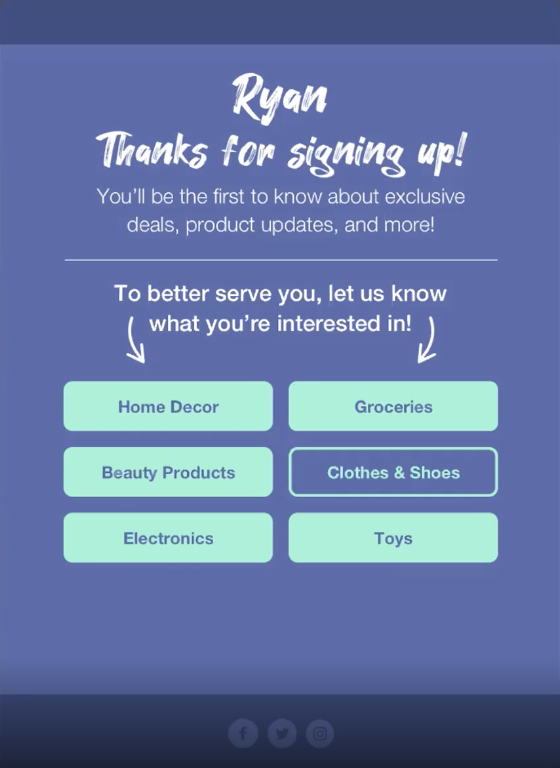
We all know how important the customer journey is; it can often make or break a customer’s opinion of your brand. Your customer experience should start from the very first touchpoint someone has with your company, the welcome email.
Rather than using that campaign only to tell readers about your brand, look at it as an opportunity to start creating engagement right away. Make it clear; this customer journey is going to be a two-way street, where you both learn about each other.
You don’t communicate enough
All too often, a potential customer will sign up for your list, get a few emails, and then…crickets. That doesn’t exactly make people very excited to keep engaging with your brand; in fact, it probably won’t take long to forget you. If you’re willing to let the relationship drop when everything is new and exciting, it’s not a great sign.
Consumers want to hear from you. But, they also want those emails to matter to them. So, especially with your triggered email campaigns, like an abandoned cart or re-engagement series, make sure you give yourself multiple chances to communicate with your readers.
You’re not personalizing emails for the reader
This is a big one. Personalized emails are more than just a hot trend; they are what consumers will continue to demand into the future. Right now, you have the tools to send your readers emails that are chock full of personalized content, from shipping tracking to loyalty points updates to product recommendations and more.
All you need to do is tap into the data you have at hand and use that to start better communicating with your customers. Go beyond the basics and create sophisticated emails that feature location data so you can generate emails that bring in the weather or local specials and offers. Use customer buying history to remind them to refill past purchases or suggest products related to items they already love.
Your emails are kind of boring
Sorry. But, it may be true. Look at your emails with an objective eye and see where you can find places to spice them up. It’s often the case that an email has had pretty good numbers for a while, so you didn’t want to tweak anything that was working. But, over time, engagement started to slow, and now you’re not getting much traction at all.
This is a great opportunity to find ways to add new and compelling content to your emails that can help drive action. Again, here personalization is the key. Create dynamic content that asks the reader to engage and share information, include buying guides for products they’re interested in or tips for getting the most out of items they’ve just purchased. There’s a lot you can do, including using animation and image personalization to make your emails stand out.
You’re not featuring user-generated content
Consumers trust other consumers more than they trust brands. Unfortunately, that’s just how it goes. If a customer is curious about buying a product from you but can’t find anything about what others thought, they could decide to move on. Not having user-generated content like ratings, reviews, and testimonials is a missed opportunity.
The good news is you can capitalize on that by including more user-generated content in your emails. For example, add a Smart Block that highlights a featured review on a recommended product or an item that the customer has left in their cart. Gentle nudges like these that include ratings and reviews can help customers decide to buy.
The bottom line
Engagement is crucial with emails. So, you need to do everything you can to find ways to boost your numbers. Reviewing your current approach and making a few tweaks can help make all the difference.
Liz Froment
Liz Froment is a content writer at Zembula. A graduate of University of Massachusetts at Amherst, Liz is a travel aficionado, Boston sports fan, and maple syrup connoisseur.