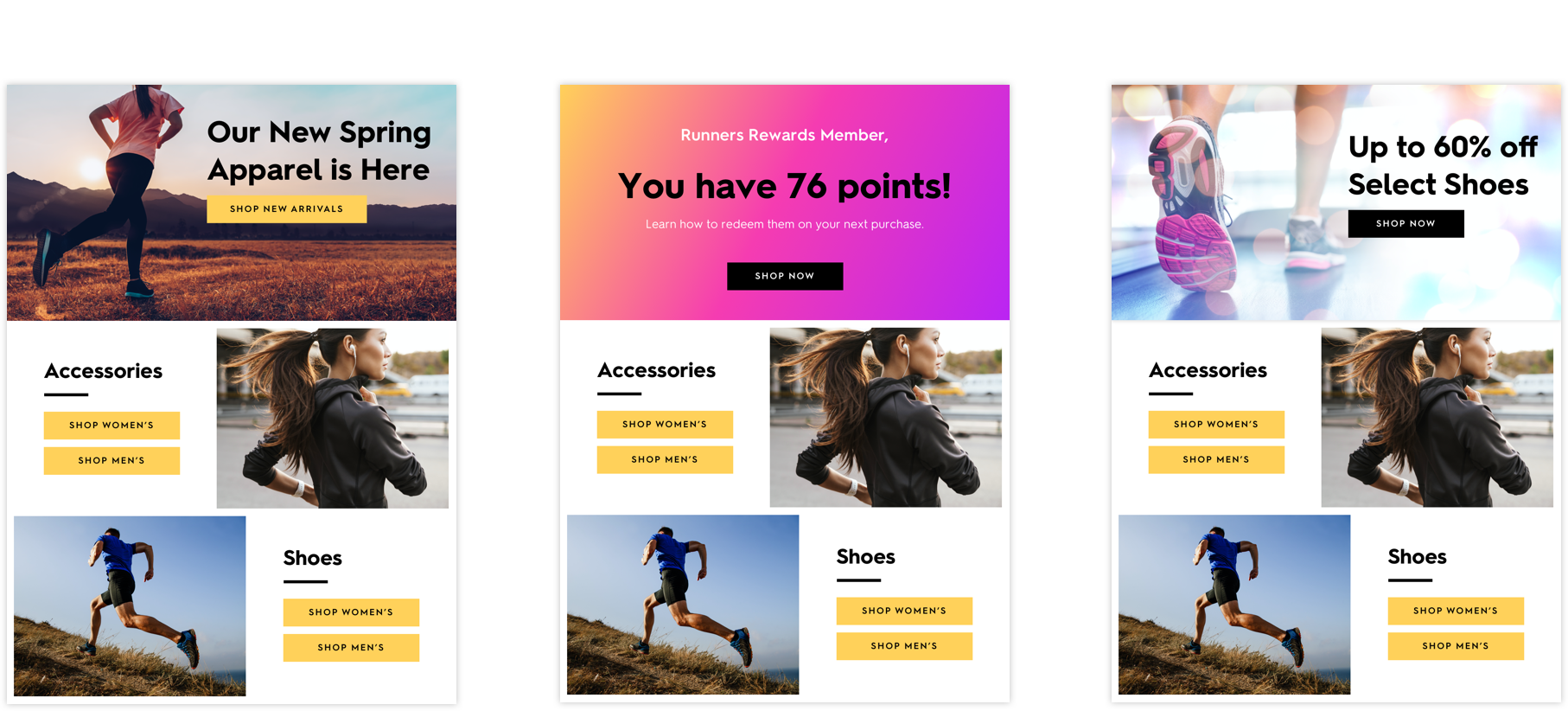
The most efficient way to deliver high fidelity personalization in your daily email, and drive over 11x return on spend (works seamlessly with your existing email service provider).
Infinitely expand your brands photography with Curator™ AI. Generate new product photography that’s indistinguishable from the originals, and combines multiple products together.
Create, manage, deploy, and target an unlimited number of personalized messages. Deliver any of the messages from your pool through a single image URL and link embedded within email, SMS, mobile, or on your website.
Zembula connects with any enterprise data source. If you don’t see a specific data source here or have a custom data source, we will always connect it for free.
The most efficient way to deliver high fidelity personalization in your daily email, and drive over 11x return on spend (works seamlessly with your existing email service provider).
Infinitely expand your brands photography with Curator™ AI. Generate new product photography that’s indistinguishable from the originals, and combines multiple products together.
Create, manage, deploy, and target an unlimited number of personalized messages. Deliver any of the messages from your pool through a single image URL and link embedded within email, SMS, mobile, or on your website.
Integrations
Connect with 100+ integrations
Zembula connects with any enterprise data source. If you don’t see a specific data source here or have a custom data source, we will always connect it for free.
Coding email templates is not my favorite task. And I have a feeling many marketers would share this with me. Creating an HTML email template is tedious and time-consuming. Just one little mistake can make your whole template fail!
When you are done coding the work isn’t over either. Then you need to test your email to make sure it is bulletproof across all devices and browsers. It’s not an easy task, and it has to be repeated every single time you touch your email code. It can be a little discouraging to change up your content too much for fear of messing up your template. But email is meant to be cutting edge and sometimes fun. Being bogged down with testing is holding you back from reaching your email potential.
We over here at Zembula know how cumbersome this is from experience! That’s why we created our solution and based it off a modular email approach. Our mission is to make sophisticated, real-time email accessible and easy to accomplish and that is baked into our platform!
You probably already know the idea behind modular email. Modular email is a design theory used in email to help content creation remain easy. Basically, you have defined sections or content blocks that can be changed between each send to have new content within them. Usually, this means the person creating the email is still having to code new email content within each block, but it is certainly faster than starting from scratch. Zembula takes it a step further than this.
Our modular approach allows you to create content blocks that are snippets of code. You paste these snippets of code into your email one time and then you can swap out the content from our platform. You never have to touch the code again. That means no more rigorous testing for each send.
This is just the first blog post in a series about our approach to modular email, but here are some of the top benefits at a glance.
Benefits of modular email with Zembula:
You never have to touch your HTML. No more HTML testing every time you send.
Easier to swap and schedule content. Automation is a breeze.
Because our content updates at the moment of open for each user, you don’t need to segment your lists.
Email marketing can be so much easier if you have the right tools on your side. Zembula can help you streamline your email efforts and give you back your marketing autonomy. Like what you see? Click here to check out our pricing!
Cheyenne Miner
Director of Marketing
Cheyenne is the Director of Marketing at Zembula where she gets to collaborate and coordinate with a team of marketing masterminds. On the weekends, you can find her in the backcountry of the Pacific Northwest, or not, because they don’t have cell towers out there.
Why content blocks are the only way to structure your emails
Today, so much of your brand’s email marketing success gets tied to customer engagement.
The brands that kill it are those who get people to open, click, and convert. But, a lot of times, that’s a lot easier said than done.
One key trick of the trade we know makes a huge impact on customers is personalization. When they crack open their inbox every morning and see a million new emails, there are likely only a select few that stand out. You want to be one of those.
The more personalized and dynamic your emails are, the better your chances of standing out in a very crowded inbox.
But, when it comes to getting super personalized, there can be a problem. It’s a real pain to change the back end of your email designs. Taking the time to code all the snippets you need to personalize your customer’s emails can take time.
Unless you’re using content blocks.
With content blocks, you can structure your emails so it’s easy for you to make changes and still gives your customers the personalization they demand.
Let’s take a look at why this is a big deal.
Use your data
Your brand has a ton of available data on your customers, just ready to go when you want to use it. You’ve got information on everything from their browsing behavior to where they live, what they love to buy, and even how far away they are from the next tier in your loyalty program.
All too often, brands aren’t using all of this data to make a difference in their emails. However, with the treasure trove of information right at your fingertips, you want to use as much of it as possible to help personalize your emails.
Content blocks are a way to do that.
You can make your emails stand out easily, by dragging the data you have on your customers into your content block images.
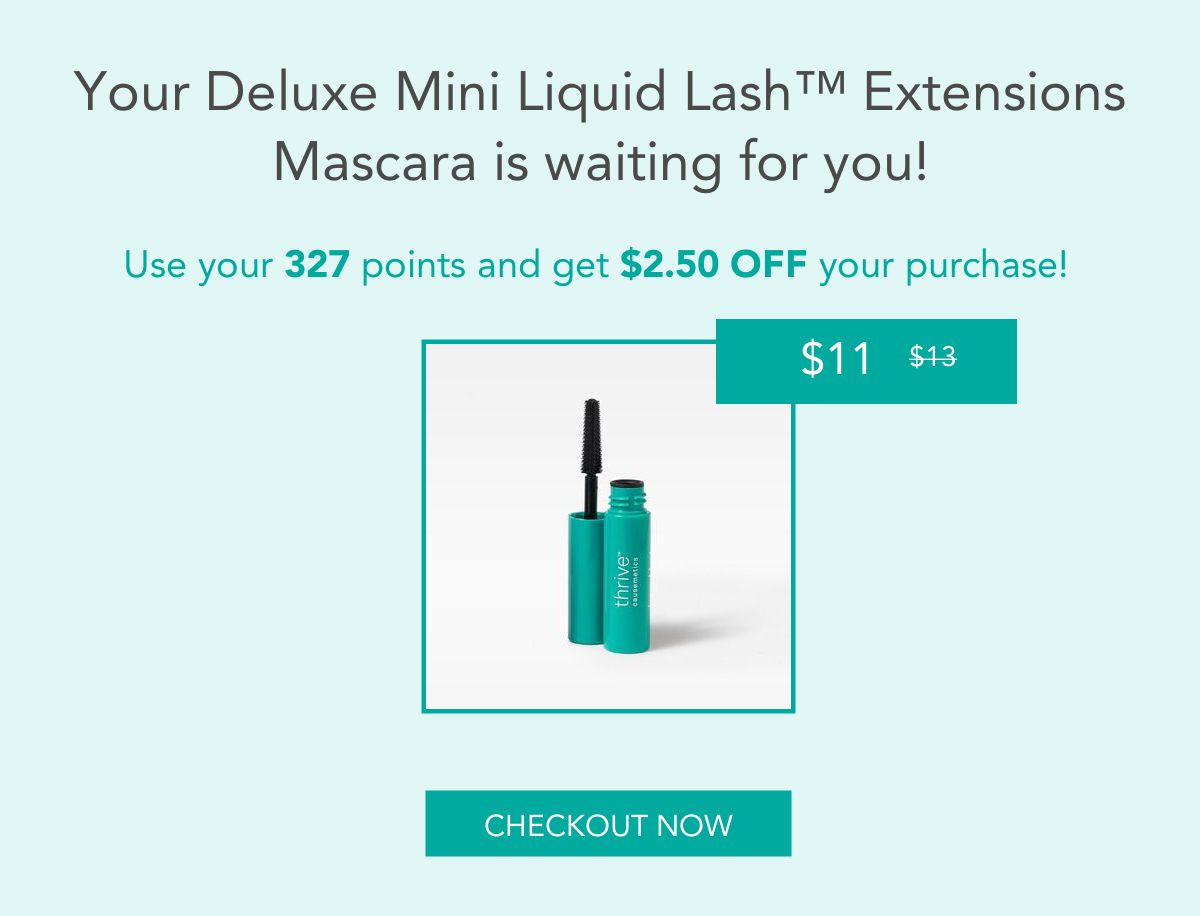
Check out the image above. With a simple click and drag, no code necessary, you can send out a personalized email to your loyalty program members. In that email, the moment they open it, they will get real-time information on exactly how many points they have.
Extrapolate that out to all the other ways you can use data for this kind of information sharing. You can highlight specific products to customers who have browsed them to show they are on sale. Or, let customers in a particular geolocation know what’s happening at their local shop.
Automation made easy
Content blocks also make designing your emails a breeze. With dynamic email content, you can drag and drop the blocks you want to create eye-catching emails quickly.
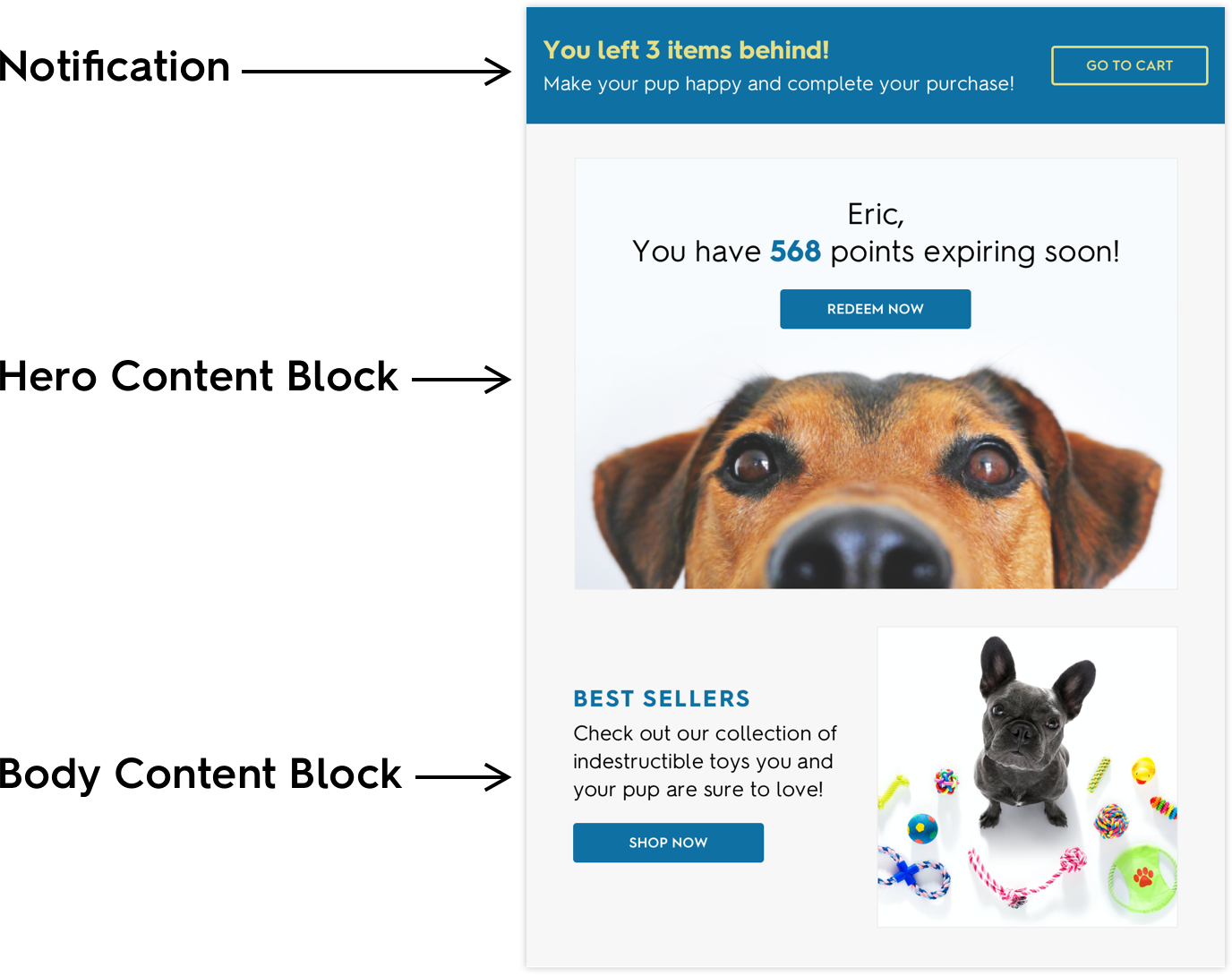
Take a look at the example above.
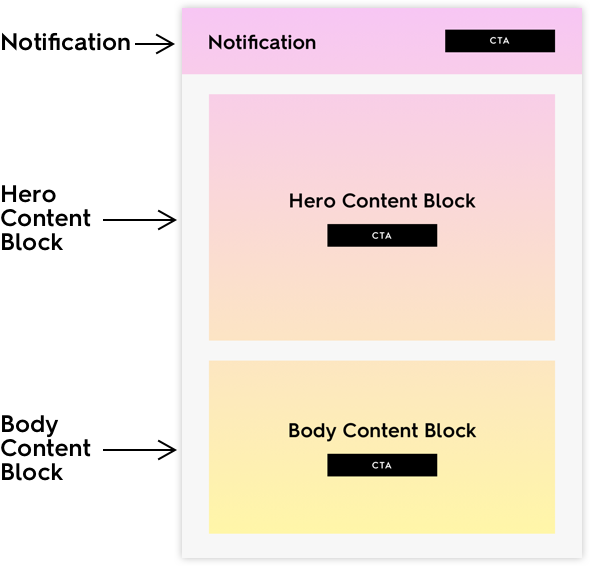
This email has a ton of personalized information spread across three content blocks.
At the top, you can see an email notification bar. This block can be a marketer’s best friend. Add it to any email, and you can turn a traditional sales email into an abandoned cart, shipping notice, or loyalty update email at the same time. And, even better, the notification bar has personalized information for each reader.
You can add more of that personalized data you want to share with your customers in the hero content block. Use it to highlight loyalty points or let customers know about an upcoming sale at your brick and mortar shop in their neighborhood. The same is true with the body block, use it to entice your customers to click and see your conversion rates grow.
Another cool feature of content blocks is you can update the information live, whenever you want, without worrying that your customers are getting the wrong emails. With moment-of-open technology, your emails will automatically update to the most up-to-date real-time information every time your customers open their emails.
That saves both you and them a ton of time. When your customers don’t have to continually search their inbox or your website to find basic information, it makes them a lot happier.
Focus on the customer
Today, customer experience matters more than ever. You want to build a long-term relationship with your customers that sees them coming back to you repeatedly. So, you want to do everything you can to give them personalized information that engages them and gets them ready to buy.
Liz Froment
Liz Froment is a content writer at Zembula. A graduate of University of Massachusetts at Amherst, Liz is a travel aficionado, Boston sports fan, and maple syrup connoisseur.
You’re Paying Too Much For Live Clicker. Here’s why.
Email personalization is a necessary part of any brand’s marketing these days. The bad news is that it can be hard to achieve at scale. The good news is that there are tons of solutions out there to help marketers do just this.
Companies like Live Clicker have emerged as leaders in the email personalization space. Until now, Live Clicker has been one of your best options to achieve your email personalization goals. Today, Zembula can help you personalize your emails for much less money and with less effort than Live Clicker.
Here are some of the reasons you’re paying too much for Live Clicker.
Zembula is more flexible
Live Clicker uses things called apps for personalized email image creation. Apps are hardcoded images that can only handle specific things. This means only one data source per image at a time, making it difficult to create sophisticated personalization campaigns. They are not flexible to use and can seriously impede a dynamic marketing campaign.
Zembula, on the other hand, doesn’t use apps. Our approach is to give you the power of using your data the way you see fit. You can connect any data source to our platform and use that data in any image. All you have to do is drag and drop it into place. Use any combination you’d like! It’s easy to use and flexible.
Zembula is more affordable
Our pricing is transparent (it’s even on our site!). No surprises here. You get access to all features in every plan without any restrictions for the low price of $0.50 per 1,000 impressions. Our baseline commitment is just $3,000 a year so it’s affordable to test the waters with us. You get all the power of email personalization for way less.
Our support is here for you
Our platform works the way you need it to. You won’t need to submit endless support tickets, but if you need a little help, we are here and ready!
We hate support that isn’t, well, supportive. Zembula is on hand to help you with whatever you need via live chat and direct email communications. No more support tickets that take forever to get resolved. Our time to market is lightning fast.
When it comes to email personalization tools you have so many options. Most of these tools have similar feature sets, but Zembula’s price will set you up for the best possible ROI. Live Clicker can help you personalize your emails, but you might want to reexamine your choice. Zembula is easier to use and easier on your budget. Let us prove it to you! Check out our site.
Cheyenne Miner
Director of Marketing
Cheyenne is the Director of Marketing at Zembula where she gets to collaborate and coordinate with a team of marketing masterminds. On the weekends, you can find her in the backcountry of the Pacific Northwest, or not, because they don’t have cell towers out there.
Easy ways to improve your ROI with personalization
Let’s face it; the goal of sending out most email marketing campaigns is to induce some sort of action on the part of the reader.
That can be as simple as opening an email. But more likely, you want your readers to engage with your email. That can mean everything from clicking a link to watching a video and yes, even buying something.
There’s no doubt you’ve probably heard a lot about how personalization helps improve your ROI with email marketing. It’s true; personalization has been shown to help increase some of the common metrics marketers watch — including open and click rates.
You might think being able to pull off a full personalized email marketing campaign is going to be tough. But the truth is there are plenty of quick and easy things you can do with some of the email campaigns you already have to help improve your ROI.
Here are a few of them.
Abandoned cart emails
If you run any sort of ecommerce shop, you know that the vast majority of items that are put into online carts are never actually bought.
That represents a lot of potential lost revenue. And when you can’t get everyone to come back and buy the things they were looking at, you can re-capture at least of some of them.
One great way to do that is through personalized abandoned cart emails.
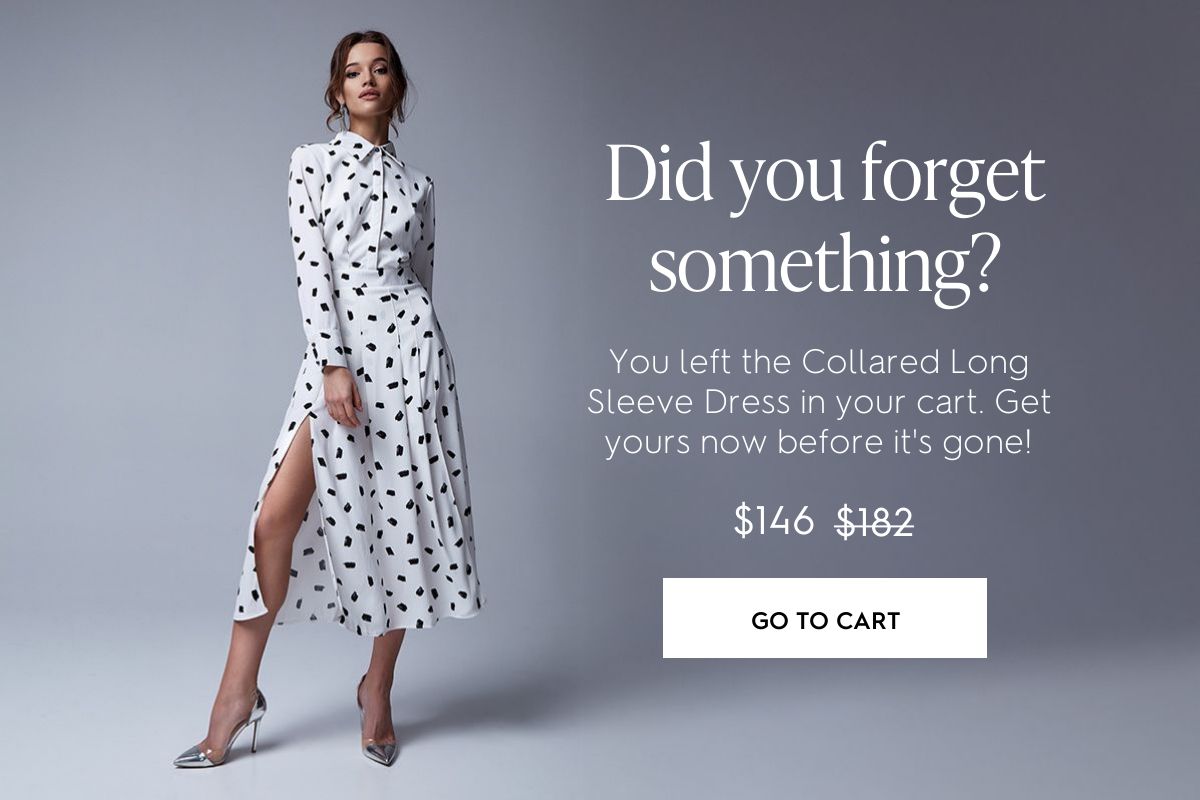
With this type of email, you’re reminding your potential customer that they forgot a few items in their cart, but everything is still waiting for them.
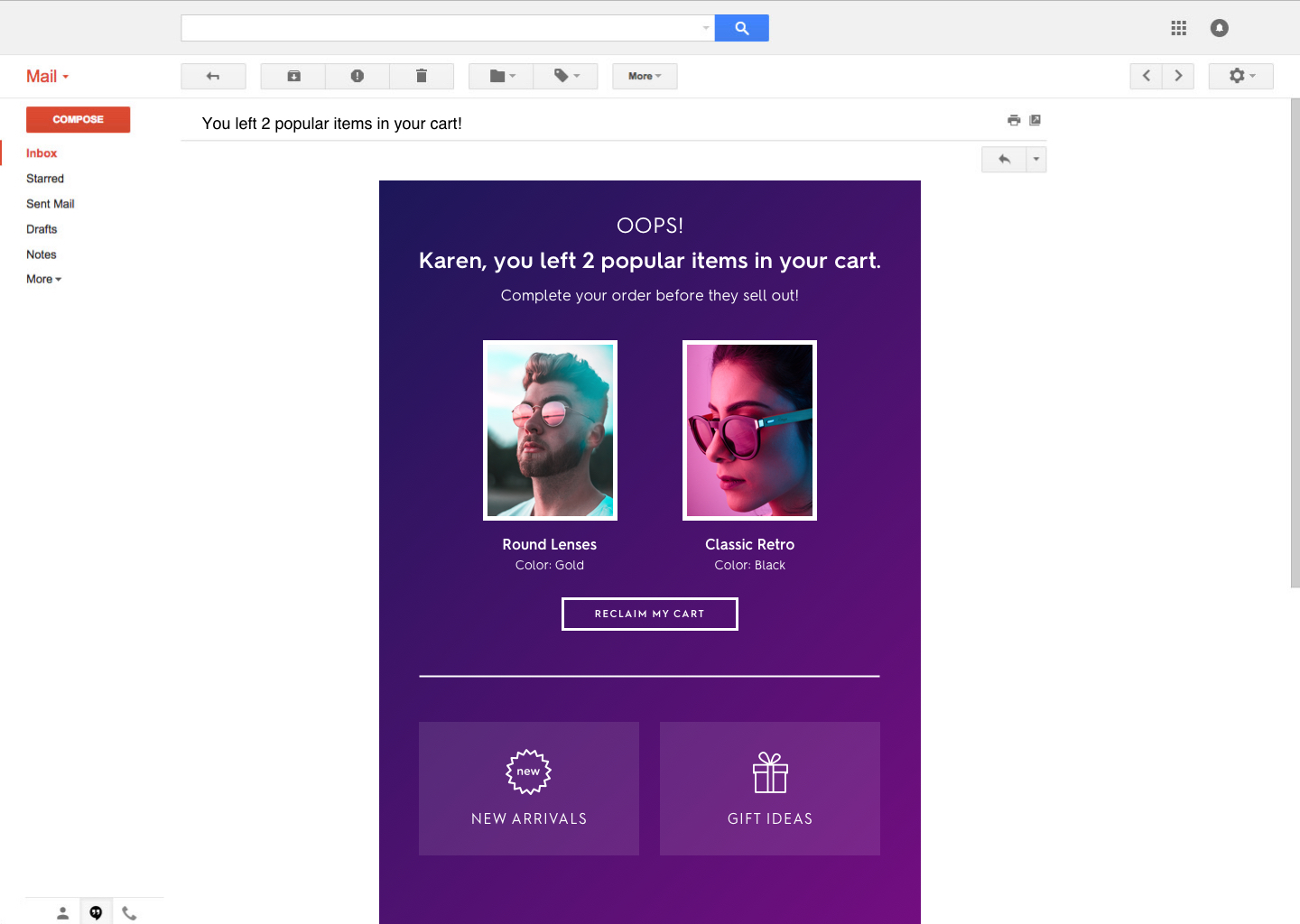
It’s even better and more personalized if you can include in the email the items that are sitting in the cart versus just a generic message.
As you can see in the example above, the email highlights the exact items left in the cart. And it goes a bit further by also teasing both gift arrivals and new ideas too.
This ties in with the next example, product recommendations.
Product recommendation emails
Another way to get really personal when it comes to emails is to use all the data you already have on your customers.
Once you can understand how they are navigating your site, what products they are buying, and are interested in, you can create personalized emails tailored to their needs.
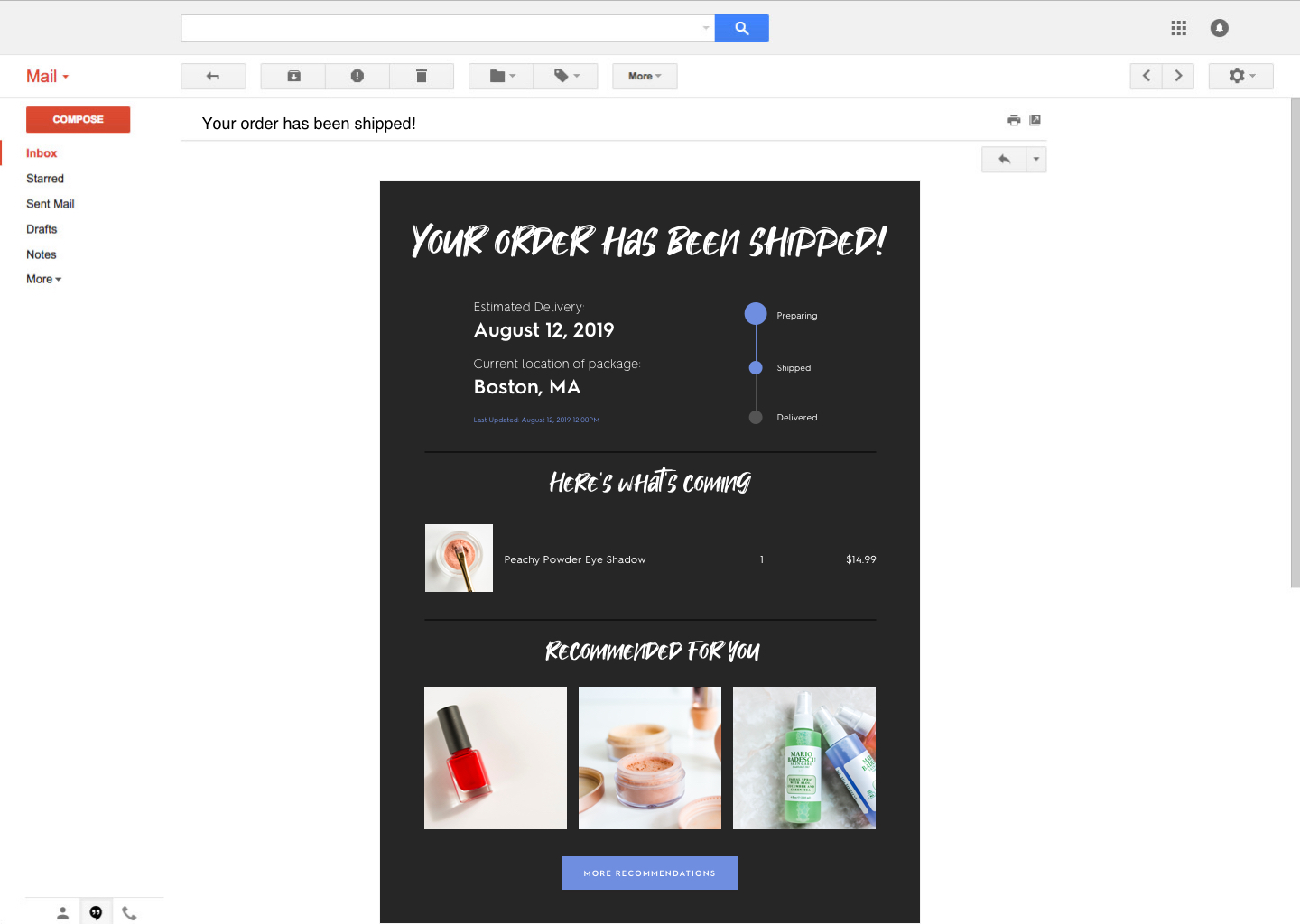
Here’s an example:
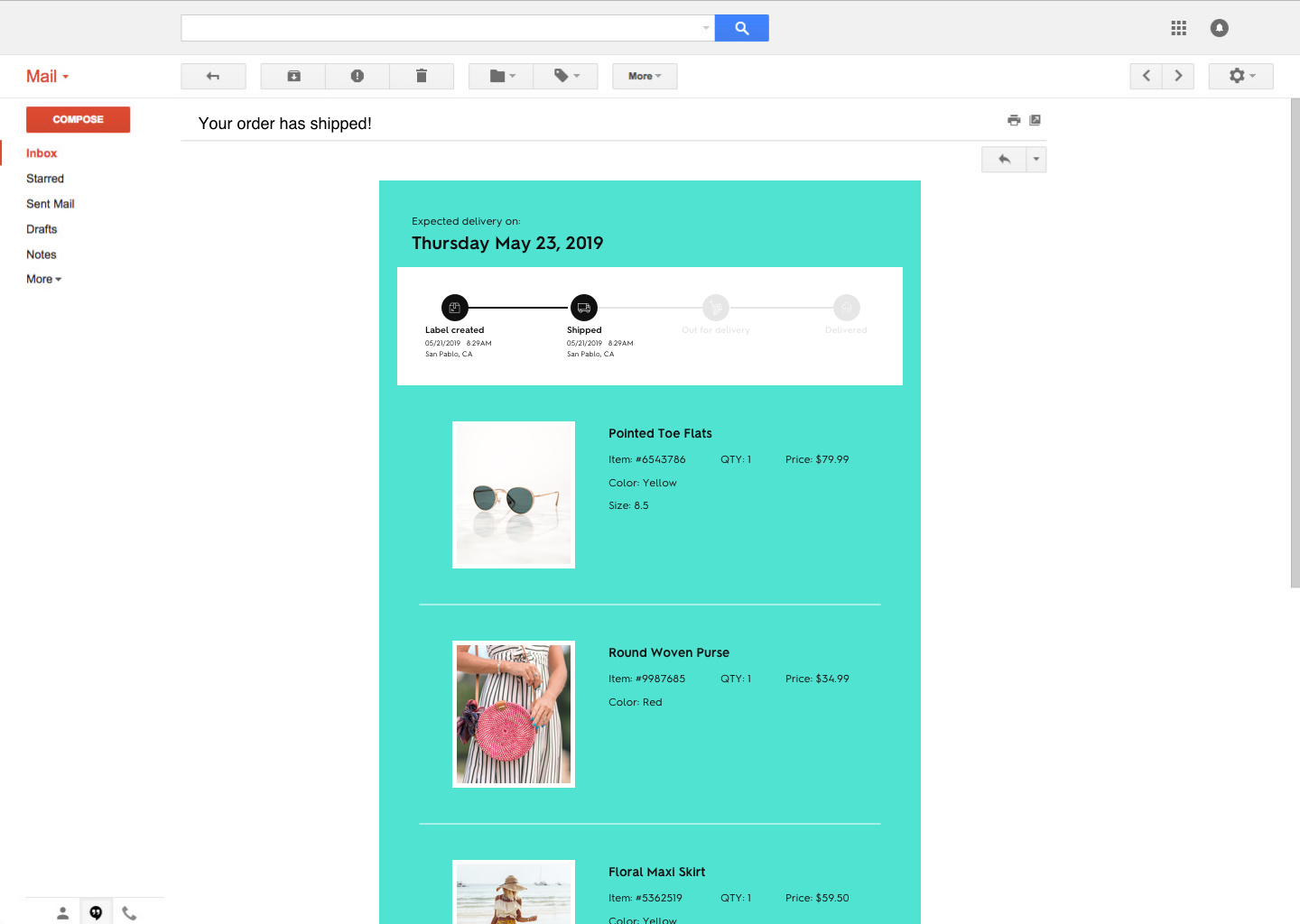
What’s cool about this email is it really takes personalization to another level. First, you have moment of open package tracking information that lets your customer know exactly where their stuff is every time they open the email.
Now, add to that a few product recommendations. The recommendations help remind your customer that there are plenty of other complementary products to buy that are related to what they’ve purchased.
Adding product recommendations to these types of transactional emails can help capture a few extra customers.
Emails that include shipping information and receipts have higher open rates, on average, so you’ll be getting a few more eyeballs when compared to your other email campaigns. And when you’re looking at even a percentage or two of new purchases, that can really add up.
Loyalty program emails
Another place you can dive into personalizing your emails for better ROI is with customer loyalty programs. Let’s face it, loyalty and VIP programs are already a great way to grab the attention of your potential customers, so why not tap into those and get even more out of them?
There are a few ways you can approach this type of email. One is to set up a trigger system that will send personalized emails out based on a customer reaching a certain loyalty milestone.
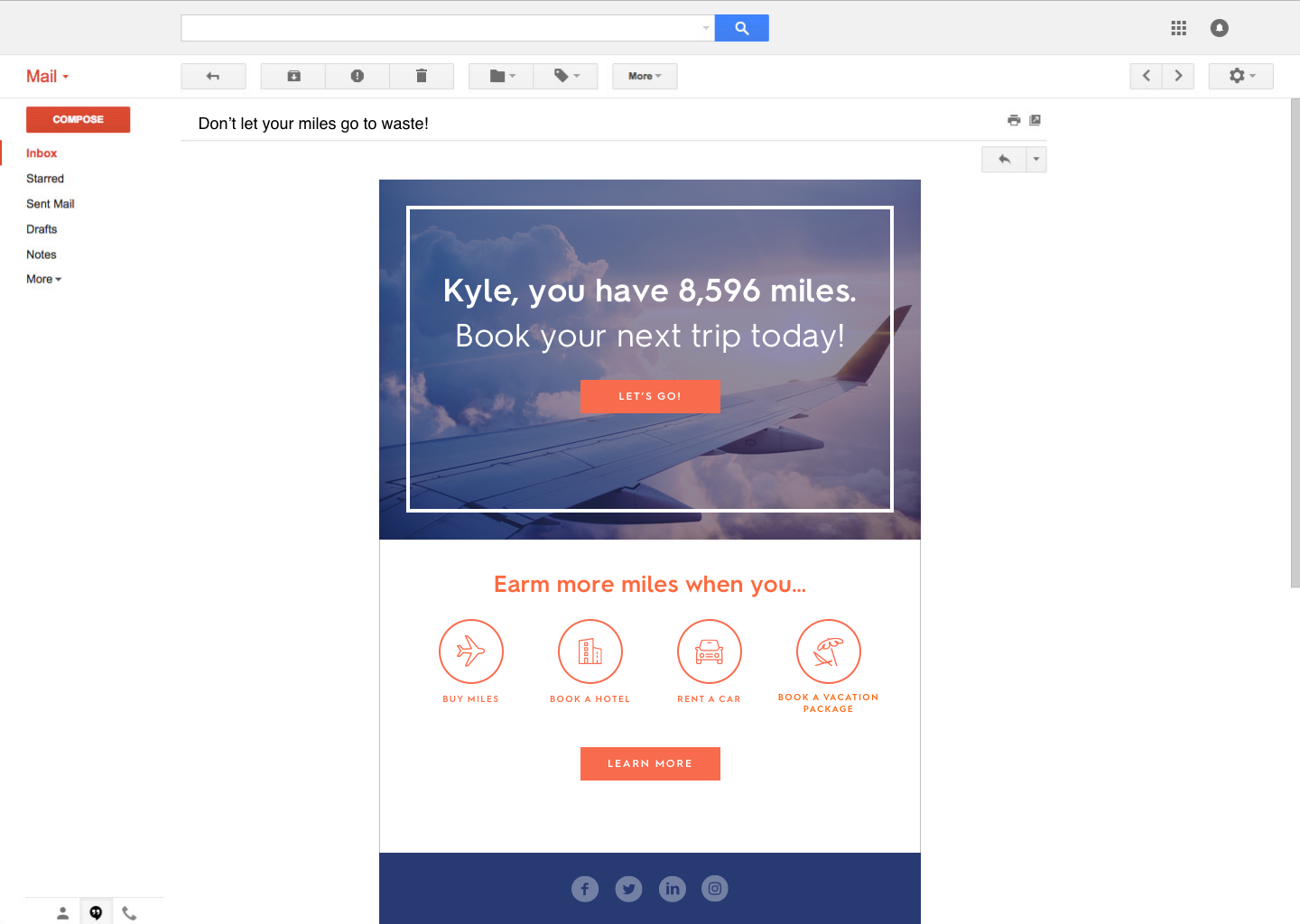
In the above example, the email is letting the reader know exactly how many miles they have. It teases the reader to go ahead and start using those miles to book a trip.
And it also goes a step further to highlight a few other ways miles can be earned so the reader can start racking them up if they want to.
Here, you could also add in product recommendations or even a coupon for a local store. So they’re quite a few ways for this type of email to be formatted to appeal to your VIPs.
At the end of the day, there are plenty of easy ways to start improving your email’s ROI with personalization. So don’t be afraid to explore the options and start making these small tweaks to your current campaigns.
Liz Froment
Liz Froment is a content writer at Zembula. A graduate of University of Massachusetts at Amherst, Liz is a travel aficionado, Boston sports fan, and maple syrup connoisseur.
Most email teams think they’re sending personalized email. They’re not. They’re inserting a first name into a subject line and calling it a day. According to McKinsey’s research on personalization, 71% of consumers expect companies to deliver personalized interactions, and 76% get frustrated when that doesn’t happen. But the bar for what counts as “personalized” keeps rising. A merge tag in the preheader isn’t going to cut it anymore.
Here’s what we see across billions of email impressions on the Zembula platform: the typical click-to-conversion rate (CTC) for an entire email sits around 2.5%. Personalized content blocks, the kind that pull in behavioral data, loyalty information, and product recommendations at open time, average an 18.3% CTC. That’s more than 7x the baseline. The gap between “we personalize” and actually doing it at the content level is where most of the revenue opportunity lives.
These five email personalization best practices come from what we’ve learned working with brands like Thrive Causemetics, J.Crew, SPANX, and Sephora UK. They’re practical, they’re specific, and they’re focused on one thing: making every personalized email you send measurably better at converting.
Practice 1: Build Each Personalized Email Block From Multiple Data Signals
Single-signal personalization (showing someone a product they browsed, or displaying their loyalty points) is fine. It’s better than nothing. But it leaves a lot of revenue on the table.
The real gains come when you layer signals together. Think about what you actually know about a subscriber at the moment they open your email: what they browsed, what’s in their cart, their loyalty tier, whether they have an active coupon, recent reviews on products they’ve viewed, and what’s trending in their region. Most of that data already exists in your stack. The problem is that most email personalization tools can only use one signal at a time.
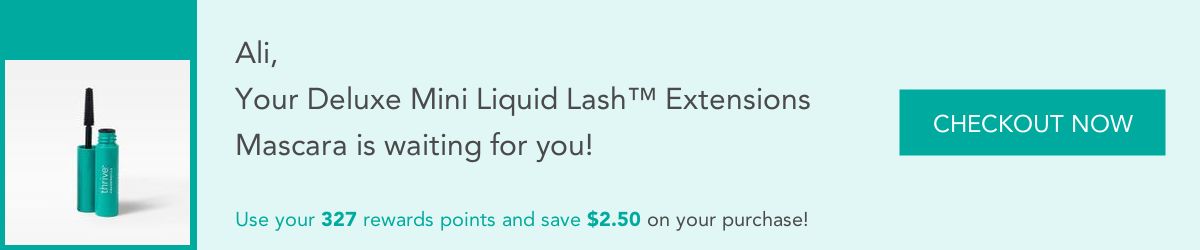
With Zembula’s Smart Banners™, a single banner can combine a subscriber’s loyalty point balance with a browsed product image and apply the points as a discount on that specific item. Here’s what that looks like in practice:
That single content block pulls from three data sources simultaneously: browse behavior, loyalty tier, and pricing. The subscriber sees a product they already want, at a price that reflects their rewards balance. That’s the kind of personalized email content that converts, because it’s specific to one person and one moment.
Practice 2: Protect Brand Fidelity With Image-Based Personalized Email Content
Here’s an uncomfortable truth: if your personalized content looks different from the rest of your email, it performs worse than no personalization at all. Subscribers notice when a content block uses a different font, or when a product image looks like it was pulled raw from a feed without any art direction. It breaks trust. It looks like spam.
This is why Zembula renders personalized content as images rather than HTML text. Image-based rendering means you can use your brand’s exact custom fonts, control the layout down to the pixel, and art-direct every product image that appears. Your personalized blocks look like they were designed by your creative team, because they were. The templates are built once with your brand standards, then the data fills in dynamically at open time.
AI-extended backgrounds are a good example of this in action. When a product image doesn’t fit your banner dimensions, Zembula can use AI to extend the background so the product sits naturally in the layout:
The result is a personalized email that feels cohesive. The subscriber doesn’t experience a jarring shift between “the email my brand designed” and “the dynamic block that some tool generated.” According to Nielsen Norman Group’s research on brand consistency, visual coherence directly affects user trust and engagement. That applies to email just as much as websites.
Practice 3: Stack Signals for Compound Conversions
We touched on layering data in Practice 1. Now let’s talk about why stacking three or more signals in a single block matters so much for conversion rates.
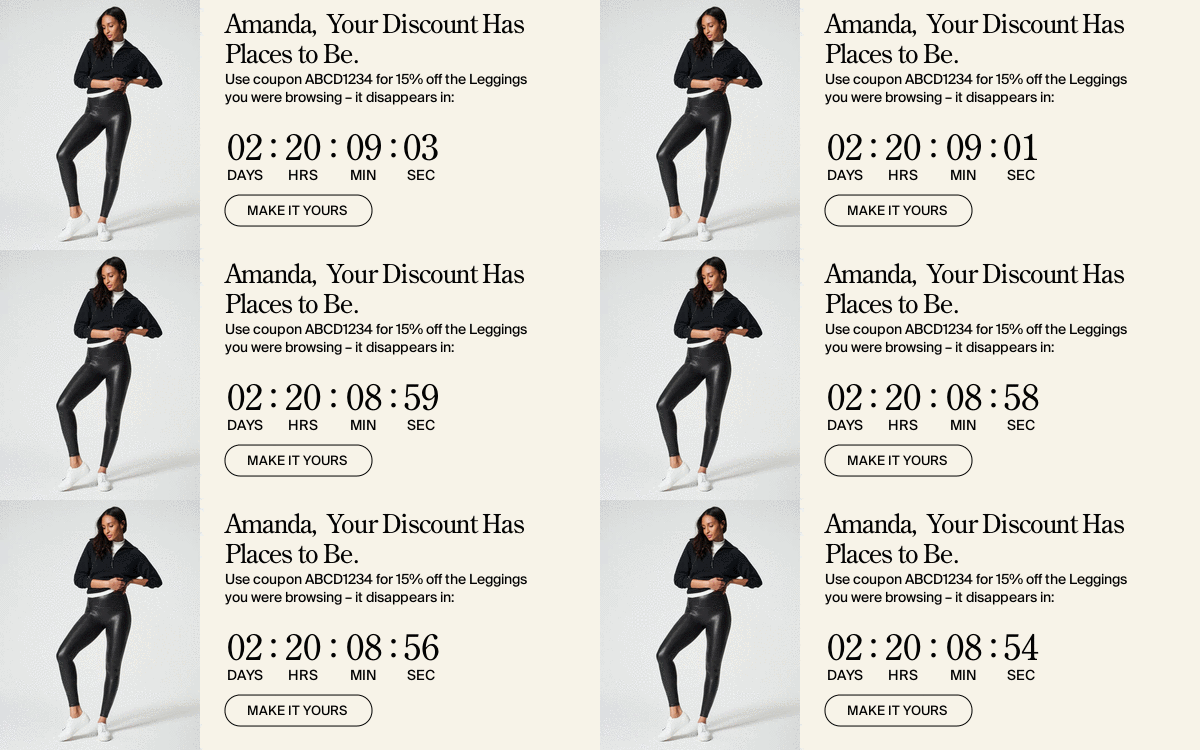
A browse abandonment reminder on its own might get a 2-3% click rate. Add a countdown timer for a personal coupon that’s about to expire, and you’ve introduced urgency. Now layer on the specific product they viewed, rendered with your brand fonts and proper art direction. Each signal amplifies the others.
We see this consistently across the platform: personalized content that combines behavioral, promotional, and urgency signals converts at roughly 5.4x the rate of the overall email. That’s the difference between a content block that informs and one that compels. Abandoned cart scenarios are a natural fit for this kind of signal stacking, but it works just as well for browse abandonment, loyalty nudges, and back-in-stock alerts.
Practice 4: Use Creative Variation to Beat Banner Blindness
Even the best personalized email content will stop performing if it looks the same every day. Subscribers develop banner blindness fast, especially on broadcast emails they receive daily. If your personalized banner has the same layout, the same color scheme, and the same position in every send, people stop seeing it. Literally. Their eyes skip right over it.
The fix is creative variation. Rotate templates, layouts, and messaging frameworks so that your personalized blocks feel fresh. This doesn’t mean redesigning from scratch every day. It means having a library of on-brand templates that your decisioning engine can pull from based on what’s most relevant (and least stale) for each subscriber.
Zembula supports over 100 behavioral use cases across loyalty, cart, browse, reviews, and offers. The combination of Smart Banners™ and Smart Blocks™ means you can vary both the top-of-email banner and mid-email content simultaneously. When a subscriber who hasn’t engaged with a loyalty banner in three sends opens their next email, the system can swap to a browse-based message or a trending products block instead.
Practice 5: Measure Your Personalized Email Performance at the Block Level
Most email teams measure open rates and total email click rates. That’s useful for big-picture trends, but it tells you almost nothing about whether your personalization is working. If your email has 8 content blocks and one of them is personalized, the overall email CTC doesn’t tell you which block drove the sale.
Block-level click-to-conversion (CTC) and revenue per mille (RPM) attribution changes the game. When you can see that your Smart Banner™ with loyalty + browse data is converting at 18% CTC while your static promotional block is at 1.2%, you know exactly where to invest. You also know which data signal combinations are working and which aren’t. This kind of attribution is how you build a business case for expanding personalization across more of your email program.
The typical CTC for an entire email is around 2.5%. Personalized Smart Banner and Smart Kicker™ content regularly hits 15-25% CTC for abandoned cart combinations. When you can see that delta at the individual block level, the optimization opportunities become obvious.
How These Practices Work Together: From Smart Banner to Smart Kicker
The real power shows up when you apply all five practices to a single email. A Smart Banner™ at the top of the email catches attention with a personalized message (maybe a loyalty tier reminder paired with a browse abandonment nudge). A Smart Kicker™ at the bottom reinforces the message with a different angle on the same data.
Here’s a real banner and kicker pair working together:
The banner and kicker use the same data signals but different creative treatments. Both are rendered as images with the brand’s custom fonts. Both are tracked independently for CTC and RPM. And both are served through Zembula’s open-time decisioning engine, so the content is fresh at the moment of open, not the moment of send.
This approach turns every broadcast email into a personalization opportunity. You don’t need to build dedicated triggered flows for every scenario. The decisioning engine picks the most relevant message for each subscriber, from a library of 100+ use cases, and renders it on the fly.
Getting Started: The Broadcast-First Approach
If you’re sending daily or near-daily broadcast emails (and most ecommerce brands are), that’s where to start. Broadcast volume is where the biggest revenue opportunity lives, because it’s the largest share of your sends and it’s usually the least personalized.
Add a single Smart Banner™ to your broadcast template. Connect your behavioral and loyalty data sources. Set up 5-10 personalization scenarios (browse abandonment, loyalty reminders, active coupons, trending products). The banner picks the most relevant scenario for each subscriber at open time.
Once you’re seeing the CTC and RPM data from that first banner, expanding to Smart Kickers™ and Smart Blocks™ is a natural next step. Each block you add creates another measured touchpoint, another opportunity to convert, and more data to optimize against.
Key Takeaways
Layer multiple data signals into each personalized email block. Browse behavior alone is good. Browse + loyalty + urgency is 5.4x better than the email baseline.
Protect brand fidelity by rendering personalized content as images with your custom fonts and art-directed product imagery. If your dynamic content looks off-brand, it hurts more than it helps.
Stack signals for compound conversions. Three data layers in a single block consistently outperform single-signal personalization.
Rotate creative templates to fight banner blindness. Static content that looks the same every day becomes invisible.
Measure at the block level. Email-level CTC hides the performance of your personalized content. Block-level CTC and RPM show you exactly what’s working.
Start with broadcast. It’s your highest-volume, lowest-personalization channel, which means it’s your biggest revenue opportunity.
Cheyenne Miner
Director of Marketing
Cheyenne is the Director of Marketing at Zembula where she gets to collaborate and coordinate with a team of marketing masterminds. On the weekends, you can find her in the backcountry of the Pacific Northwest, or not, because they don’t have cell towers out there.
Why Contextual Email Marketing Needs To Be Part Of Your Marketing Stack
The main goal of any email marketing campaign is to convert readers to buyers.
There are many ways to do it, but few companies are capitalizing on the true potential of email as a tool to help drive conversions. In order to do that, you need to create emails that are interesting, educational, interactive, and contextual.
Going the extra effort to create these types of emails can drive massive results. That’s because the emails your reader gets are crafted to speak directly to them, their needs and interests.
The big focus on creating emails that are personalized, and one way to do that is through contextual email marketing.
In this post, we’re going to highlight why contextual email is an important email marketing strategy.
Let’s dig into it.
What is contextual email marketing?
Contextual emails are those that are personalized to your customer’s needs based on specific and relevant information. Some of these include customers’ geolocation, behavior, and previous purchases, among other options.
Today, personalized emails are often seen as the keys to the email marketing kingdom. That’s easy to understand; there’s endless competition for attention, especially when it comes to the inbox.
Consumers are getting dozens, sometimes a hundred emails a day. And the reality is it’s hard to stand out. You need to get your readers to pay attention, click, and eventually buy.
That’s where contextual emails come into play.
Uses for contextual email
Contextual email marketing lets you get super personal, almost like you are sending your emails to a list of one.
You can do this by tapping into using real-time data that is personalized for your readers right at the moment of open.
Geolocation
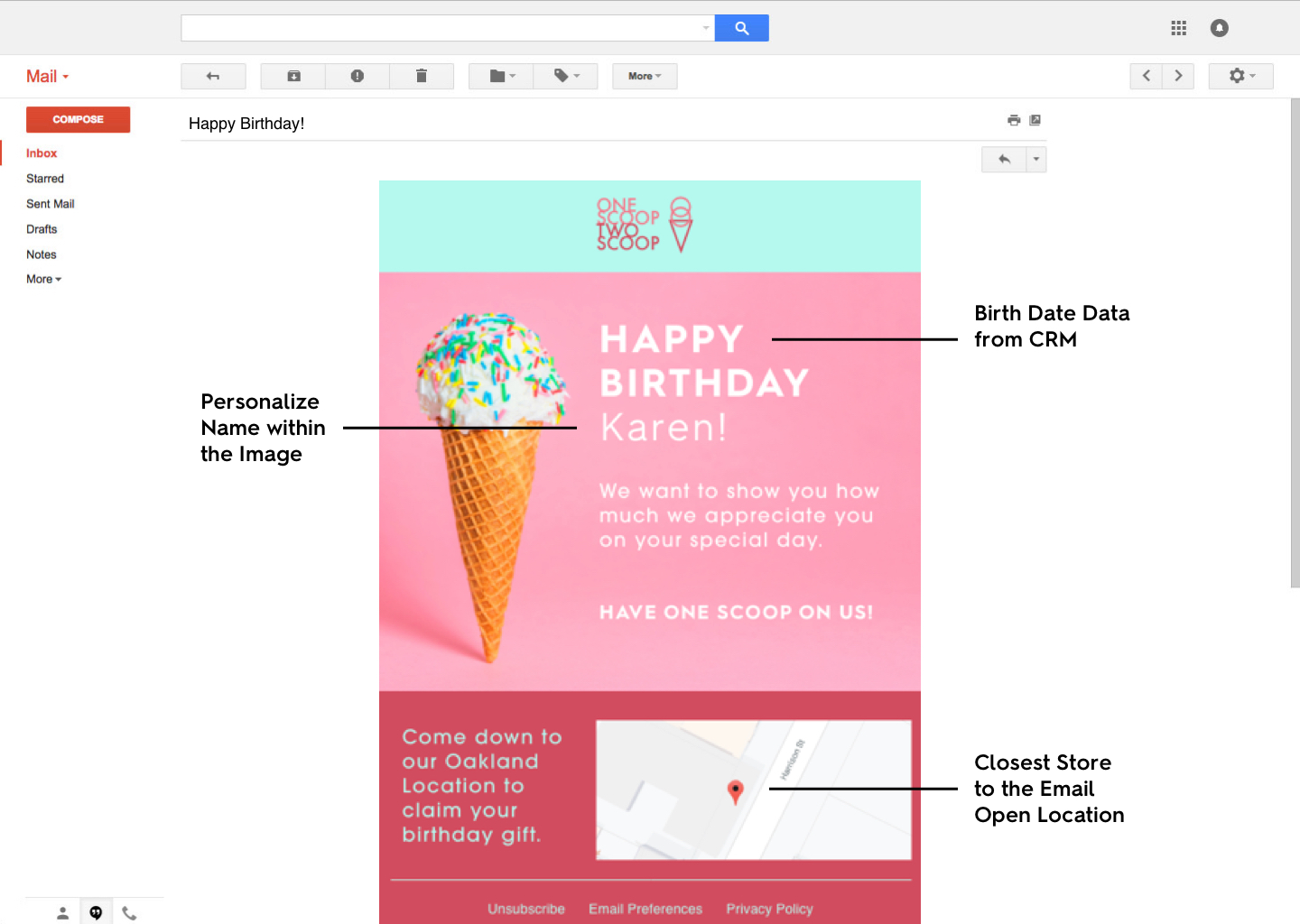
Here’s one example:
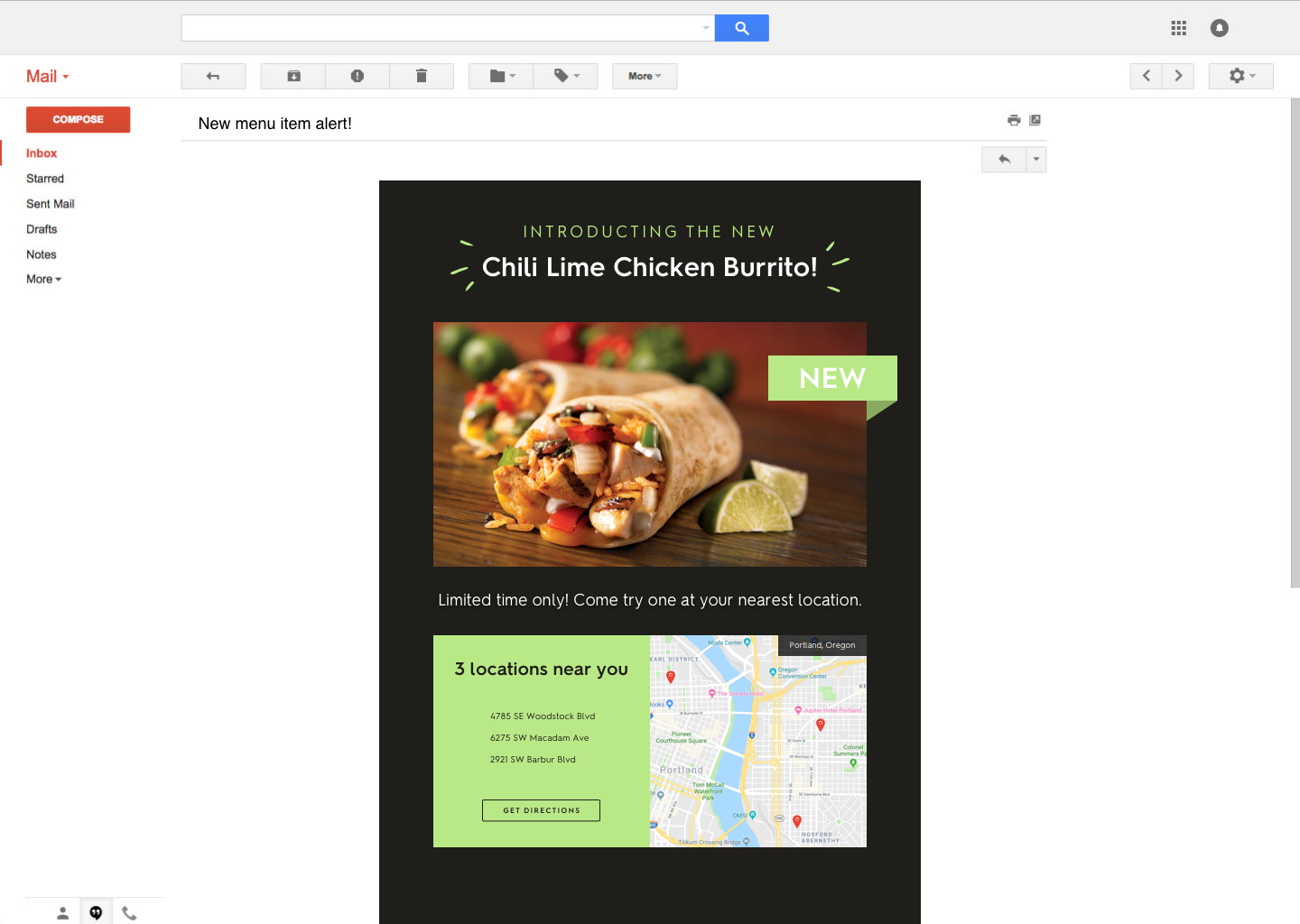
This email is chock full of personalized information. If you tried to segment a list that included birth dates, location, and name, you’d really struggle to make it work.
But with contextual email, you can set your emails to pull in all sorts of critical data to make every reader feel like the email you’ve sent was meant just for them.
That’s because it was.
In this case, geolocation means that the reader can get real-time location data on their closest local shop.
Live data
There are some other uses for contextual email that can pull in real-time information too. In these cases, every time your subscriber opens their email, they will get the latest information right from that email. They won’t have to go to another site; it will be right in their inboxes.
So there are a few options brands are looking at for this.
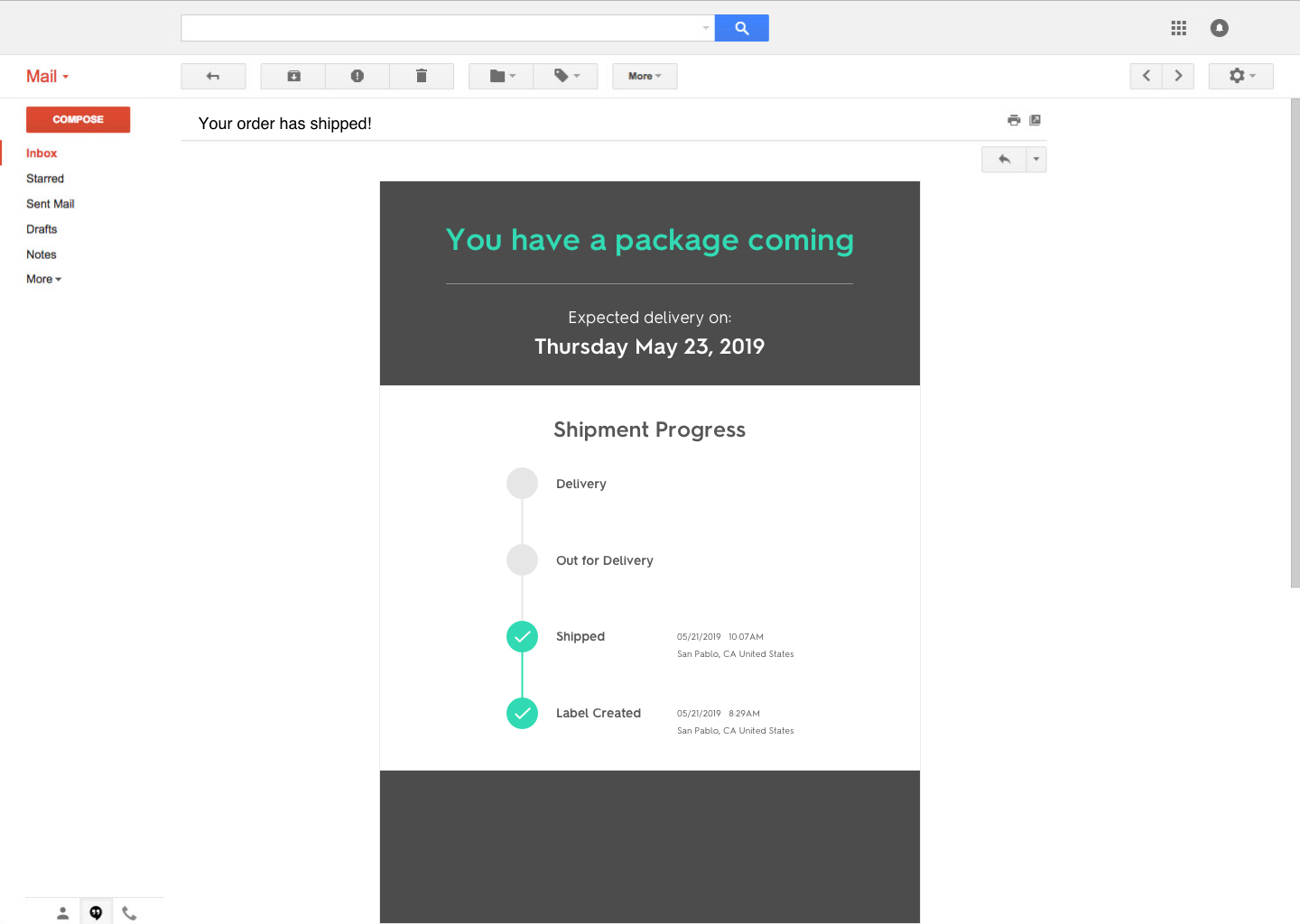
One is with package delivery. With an option like this, every time your subscriber opens up their email, they will get up to the moment delivery information.
That’s something that can make a significant impact versus the standard way of trying to track packages. In those cases, you usually don’t get that updated information or you have to go to another site to find it.
Another way to pull in this data is through social media feeds too. If you’re a brand that really relies on social media to pack a punch and motivate potential customers to engage, this could be a great option too.
This type of contextual email can pull real-time data right from your social media feeds and highlight what you’re posting.
Weather
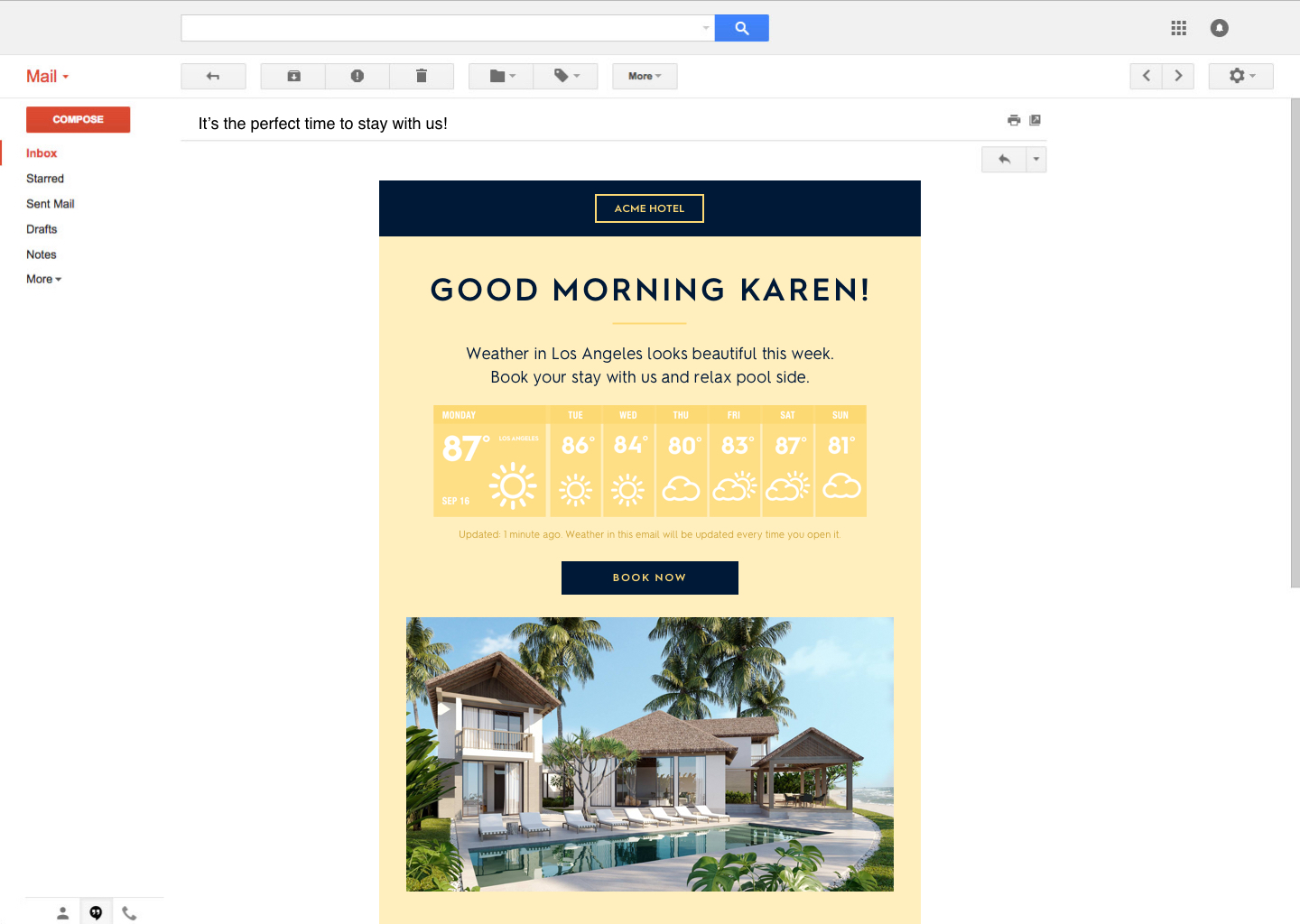
Speaking of geolocation as a prime tool, here’s another example:
With an email like this, geolocation is doing two things here. It’s targeting both the current location of the recipient as well as a seemingly ‘more desirable’ location based on weather.
An email like this can tap into some psychological triggers like fear of missing out (FOMO) to get someone to decide to book that vacation because the call of beautiful weather might just be too much to resist.
Weather provides a huge opportunity to make a difference in your subscriber’s inbox, especcally in terms of contextual marketing.
Embracing contextual email
These are just a few of the ways contextual email can make a huge impact on your overall email marketing stack.
Implementing real-time personalized data into your emails that are relevant to your readers is one marketing strategy that can end up making a real difference to your bottom line.
Liz Froment
Liz Froment is a content writer at Zembula. A graduate of University of Massachusetts at Amherst, Liz is a travel aficionado, Boston sports fan, and maple syrup connoisseur.
How To Use Up-To-The-Minute Weather Data To Capitalize On FOMO
One of the best tactics any marketer can deploy is FOMO; fear of missing out. It’s the term coined for when you feel anxious or actual fear that you’re missing some cool or fun activity or event.
Fear of missing out is a powerful psychological trigger; you’ve probably felt it yourself.
Spend any time scrolling through Instagram and seeing your friends at a concert or event together that you were invited to but passed up.
What do you feel?
If you’re like a lot of other people, you probably like you missed out, even if you had a really good reason not to go. Sometimes the fear of FOMO is so intense that people will say yes to doing something they aren’t even all that into merely because they are afraid they might potentially miss out on something down the line.
We’ve all been there.
But what makes it so powerful?
Why FOMO works
We consider FOMO to be one of the primary psychological triggers that cause people to take action. It’s one reason why reveal marketing is so popular. When a consumer is faced with something like a scratch it or smash it to reveal the ‘prize’ behind it, they are more likely to engage.
That’s because they don’t want to miss out on the surprise. Even a small trigger like that can get the fear of missing out flowing and translate into the consumer taking action.
It’s one of the reasons why the fear of missing out can be so powerful to many people. It’s also why FOMO is becoming an increasingly important behavioral and psychological tool for marketers.
And that certainly applies to email, especially when you start to use the fear of missing out in conjunction with personalized information. It’s the perfect way to create more opportunities for customer acquisition.
Here’s how to approach it.
FOMO and the weather
One of the coolest trends in email marketing today is getting super personalized in the content you send out. With geolocation tagging, that means you can target people in specific locations.
Sounds good, right?
Now, take that a step further and add in real-time weather data to your emails that are bang on for the local forecast.
For hospitality chains, especially, this can be an excellent way to reach out and tap into the FOMO of people on your list who don’t live near you.
Take a look at this example email:
This is a perfect way to start tapping into FOMO via email.
Let’s imagine Karen lives someplace where it’s cold and snowy. Maybe she’s been thinking of taking a trip but hasn’t quite decided where she wants to go.
Now, getting an email in the middle of a snowstorm that showcases how nice and warm and sunny the weather is in Los Angeles can start triggering some serious FOMO.
By just staying home, bundled up with the fireplace on, she’s missing out on the chance to run on the beach or go for a swim. Something as simple as that can be the deciding factor for Karen to plan her escape to Southern California.
Without that push that focuses on her potential fear of missing out, it might be much more difficult to sell.
Benefits of real-time weather updates
This email is doing a lot of interesting stuff.
It’s got real-time weather updates. Every time Karen opens this email, even if it’s a week from now, the weather is going to be the correct forecast.
When you’re making decisions on sending out strategic campaigns that need to be both personalized and segmented, having the ability to plan around weather and geolocation is a great tool.
You can use this in reverse too. Maybe your subscribers in Southern California want a ski vacation. So using the weather to show that there’s plenty of power on the slopes can make a compelling case for them to take action.
FOMO and the weather can work for events as well. If you’re running a festival or an outdoor sale event, for example, you can highlight how great the weather is going to be while selling your last minute tickets too.
There’s plenty of creative options for marketers who want to start incorporating real-time weather updates into an email campaign. Are you ready to give it a shot?
Liz Froment
Liz Froment is a content writer at Zembula. A graduate of University of Massachusetts at Amherst, Liz is a travel aficionado, Boston sports fan, and maple syrup connoisseur.
As marketers, we all hear about the importance of fine-tuning our email marketing strategies. Often, though, these are focused more on a welcome series or other types of nurtures designed to convert leads into customers.
What if we told you that there is actually a more effective email series to focus on? Order/shipping confirmations are often overlooked as an engagement tool. However, they have the highest open rates of any emails. On average, the open rate for a confirmation email is 70%. Additionally, because these emails contain information in them that people truly want to find, they spend almost double the amount of time reading them than other emails.
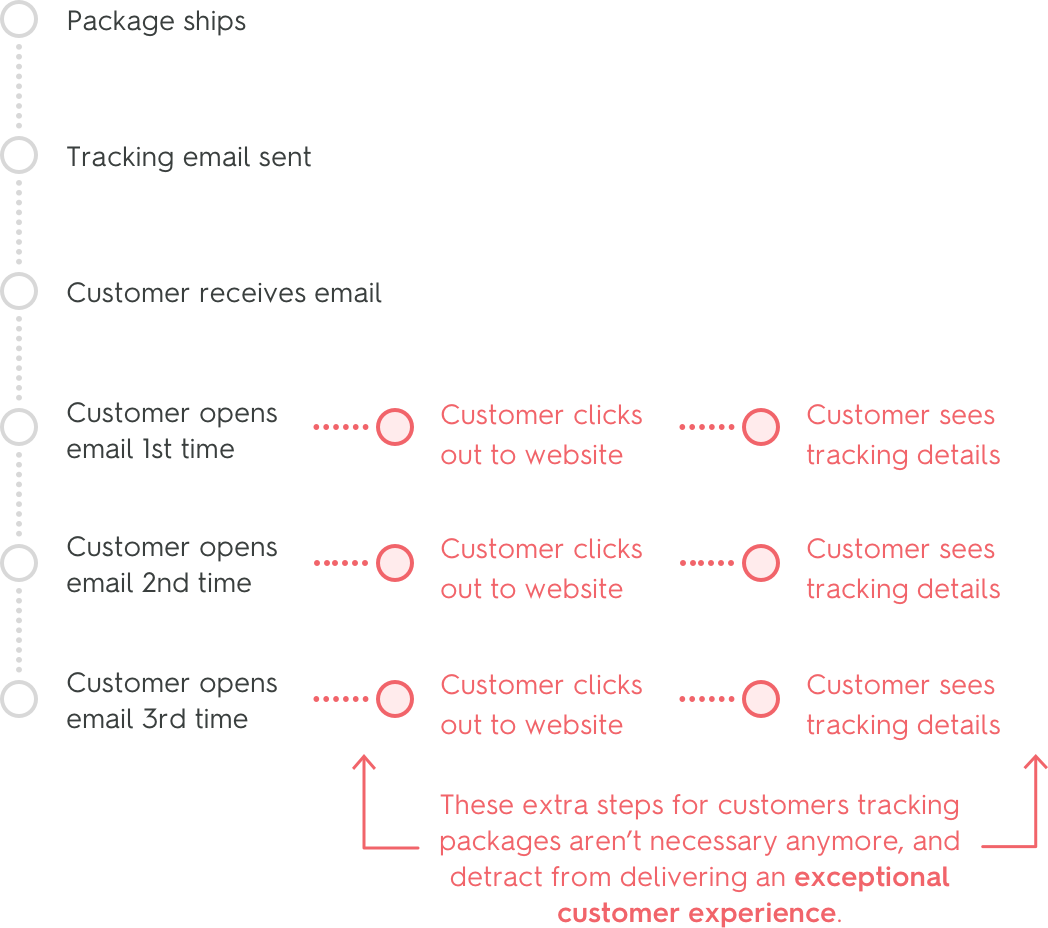
However, there are some drawbacks to this type of series, primarily the fact that, until recently, it had to be a series, containing at least the following: order confirmation, shipping confirmation and delivery confirmation. This means that the pertinent information that a consumer wants and needs is contained in at least 3 different emails.
However, with the introduction of Zembula’s live images, all of the emails in an order confirmation series can be simplified into one email, which benefits both the marketer and the consumer. Now that all of the confirmation and tracking information is dynamically updated within one email, the marketer saves time and money by not having to design and send several emails. And for the consumer, they only have to refer to one email for all of their order information needs.
We want to make sure you get the maximum engagement from your email, so we have put together a few best practices for creating a live image to use in your shipping email.
Make it clear to the customer that they will only need to refer to one email
Because, as consumers, we’ve all been conditioned to expect at least 2 emails upon making a purchase – an order confirmation and a shipping confirmation – it may take a little bit of educating the recipient that all of their order information will be in one email. It’s as simple as including a phrase informing them to refer back to the email regularly since it will be updated with new information dynamically.
Keep it simple and clear
A mistake that marketers often make is making things too complicated. In an order confirmation email, there is no need to be wordy. Recipients really want to know a few key things:
Order number
Order information – including delivery address, items ordered, etc.
Tracking number
Delivery status
Organizing this information in a clear, simple design will only serve to increase the value of the email to the consumer.
Include tracking information
This seems like a no-brainer, but many of us here at Zembula have received order confirmation and shipment confirmation emails that don’t actually include a tracking number. Many of them refer us back to our own accounts on the website we purchased from, adding in a time-consuming and annoying step. So, we are here to impress upon you the importance of including shipping and tracking information within the email itself.
While the shipping information will dynamically update each time the user opens their email, it is also always a good idea to include a link to the carrier site (passing through the tracking number) and a link to the order on your own site.
Include visuals
Yes, you want to make sure you keep the information presented in a clean and organized way, but that doesn’t mean you can’t make it more enticing by incorporating some fun imagery. What’s more, with live images, you can make those images and design elements dynamic. For example, you can include an image of a delivery truck that progresses along a route each time the package status changes within the email.
In addition to design elements, you might find it beneficial to also include images of the products in the order. Seeing the image of the item they just bought has a greater chance of spurring inspiration to purchase something else than words alone. Which brings us to our final best practice:
Take advantage of the upsell opportunity
Knowing that your customer is already spending almost double the amount of time on this email, why not capitalize on that by showing them other products they may be interested in?
With Zembula’s live images, you can easily populate products based on the customer’s purchasing history. Whenever your customer refers back to the email to see the updated status of their order, they’ll see the items and hopefully get inspired to make another purchase!
Want to learn more about how you can use Live Images in your order/shipping notification emails? Chat with an expert now!
Tori Johnson
Tori is the marketing manager at Zembula. A graduate of Portland State University with a BA in Marketing, she enjoys good food, international travel, baby animals, and the occasional video game.
Why loyalty matters: how to reward your VIPs with personalized loyalty updates
If there’s one real goal for marketers, it’s building a loyal customer base.
In fact, for many brands, customer loyalty is the whole ball game. A loyal customer base is one that loves your product or service and will buy from you again and again.
Study after study has shown just how vital building customer loyalty is to overall business success.
“43% of customers spend more money on brands they’re loyal to.”
“Lowering your customer churn rate by 5% can increase your profitability by 25 to 125%.”
“68% of customers leave because they feel the company doesn’t care about their business.”
“69% of consumers say the choice of retailer is influenced by where they can earn customer loyalty/rewards program points.”
All of those stats point to one major thing, customer loyalty matters.
Unfortunately, a lot of brands take customer loyalty for granted. They think that once the customer buys, the journey stops there.
But the truth of the matter is the more time you spend engaging and nurturing your current customers and making them feel like VIPs the more likely they will stay with you for life.
So how do you do that?
Building loyalty through email
One way is through email.
Lots of brands have customer loyalty programs. Think Starbucks, Sephora, and Jet Blue as common examples. Maybe your local coffee shop has one of those little buy 10 get one free loyalty cards, or your gym has a monthly give away.
These are all examples of programs geared toward rewarding customers and encouraging them to buy again.
If you’re worried that your small business can’t compete with these big-name brands, think again. There are ways you can use your email marketing strategy to really move the needle with your VIPs and required them in fun and creative ways.
The secret weapon?
Real-time personalized updates
Everyone loves getting emails that are all about them. After all, for most of us, we’re our favorite topics!
But when it comes to email, the more personal, the better. So if you’re able to send a personalized email that shows real-time updated information about a persons account and loyalty status, they’ll love it.
Here’s a fun example:
Airline miles are really common loyalty programs. But, who knows the number of miles they have off the top of their heads? Probably not many people.
However, an email like this serves two purposes. First, it’s a personalized reminder of how many miles they have earned. And second, it encourages the reader that they can book a trip using those miles right now.
So that vacation they’ve been thinking about? Right now would be a perfect time to book a flight.
There are other ways to use personalized emails for loyalty programs too — including some out of the box options.
You can also personalize based on geolocation.
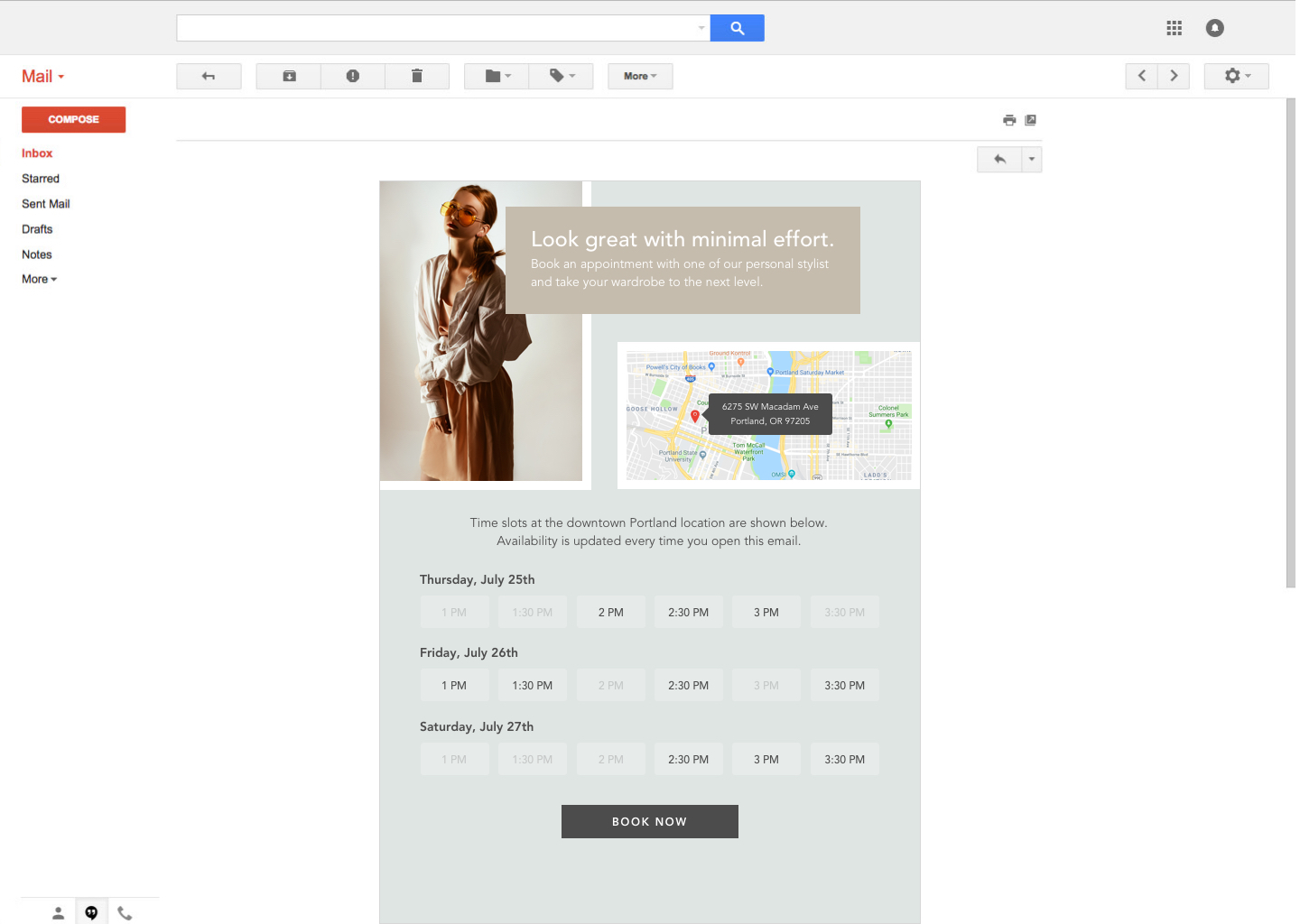
Let’s say you’ve got a particular product going on sale next week, but only in a handful of stores. You can send out an email that only contacts those VIP customers in the immediate area and offer them first dibs on setting up an appointment.
Personalized emails can also be used to feature particular products. If you run a points program and track what your customers buy, then you can tailor specific products or services that you know your customer loves. Find those products that qualify for special discounts or coupons that align with their points and send an email highlighting them.
These are all ways to help build customer loyalty that caters to their interests and doesn’t take them for granted. You’re showcasing that you care about them and what they are interested in and you’re also making it really easy to take the next step and buy.
That’s a nice win-win for both of you.
Start building loyalty now
At the end of the day, personalization matters now more than ever. So you have to find ways where you can tap into personalization and engage your customers.
Using loyalty rewards coupled with personalization based on location, purchase history, and interests is a great way to get started.
If you haven’t already, it’s critical to start developing a strategy for those customers who have already demonstrated their loyalty to your brand. Take care of them, make them feel loved, and they’ll do the same in return.
Liz Froment
Liz Froment is a content writer at Zembula. A graduate of University of Massachusetts at Amherst, Liz is a travel aficionado, Boston sports fan, and maple syrup connoisseur.
Moment-of-Send vs. Moment-of-Open: What Real-Time Email Really Means
We’ve all received some kind of personalized email by now. After all, it’s almost 2020! Personalization has been a driving force in email campaigns for over a decade. Most personalization is as simple as inserting a name in the subject line, but some brands go deeper to send you emails filled with product recommendations, images personalized with your geolocation data, and more, claiming that they are delivering real-time data. Quite a few companies truly believe that this is what they’re being sold by third-party personalization services! Unfortunately, this data is typically only accurate to the moment the email is sent. True moment of open data personalization is incredibly rare and very very expensive.
What do we mean by moment of open? Depending on, for instance, where you open an email, the data being pulled and personalization of the email may change. Say you open an email for the first time while you’re travelling. Instead of getting geolocation data for your hometown, true moment of open would recognize that you are somewhere else, and adjust accordingly. So instead of data for Chicago, it would give you data for New York, for example. Real time updates are pushed exactly when the recipient opens the email (not just the first time, every time!), so they’re always getting the very latest and best information tailored to them. With normal personalization, or moment of send data, data is only pulled before you send the email, resulting in a possible disconnect for the person reading. You also can’t update your emails once they’re sent!
Zembula offers real-time, moment-of-open personalized email images at a fraction of the cost. Because we’re truly pushing moment-of-open updates, you can change or update your images post-send and those updates will be pushed to your recipients whenever they open your email! Customers who receive personalized emails are “10x more likely to be a brand’s most valuable customer—expected to make more than 15 transactions in one year” according to ThinkRelay. You can quickly and easily make interacting with your brand more appealing and drive revenue at the same time.
Curious to see how Zembula makes it happen? Schedule a demo!
Tori Johnson
Tori is the marketing manager at Zembula. A graduate of Portland State University with a BA in Marketing, she enjoys good food, international travel, baby animals, and the occasional video game.